Google

Aug 22, 2014

What are the different ways a Java thread gets blocked or suspended? How will you debug Java threading issues?

1. It has been put to sleep for a set amount of time

 
   public void run(){
       try{
           while(true){
               this.sleep(1000);
               System.out.println("looping while");
            }
        }catch(InterruptedException ie){
        ie.printStackTrace();
  }
   }


2. The thread is suspended by call to wait( ), and will become runnable on a notify or notifyAll message.

 
class ConsumerProducer {

   private int count;
  
   public synchronized  void consume() {
       while(count == 0) {
          try {
        wait();
    }
     catch(InterruptedException ie){}
       }
       count--;   //consumed     
   }   


   public synchronized void produce() {
         count++;
   notify(); //notify the waiting consumer that count is incremented 
   }
   
}


3. Using join( ) method, which means waiting for a thread to complete. In the example below, the main thread that spawned worker threads t1 and t2 will wait on the t1.join() line until t1 has finished its work, and then will do the same for t2.join( ).

 
    Thread t1 = new Thread(new EventThread("event-1"));
    t1.start();
    Thread t2 = new Thread(new EventThread("event-2"));
    t2.start();

    while (true) {
        try {
           t1.join();
           t2.join();    
        }
        catch (InterruptedException e) {
            e.printStackTrace();
        }
     }


4. Threads will be blocked on acquiring an intrinsic or explicit lock. Understanding Java locks and synchronized keyword.

5. Threads can get blocked on a long running I/O operations. For example, on a call  to long running database operation.

Threads block on I/O so that other threads may execute whilst the I/O operation is being performed.

class MyServer implements Runnable {
  public void run() {
    try {
       ServerSocket ss = new ServerSocket(PORT);
       while (!Thread.interrupted()){
           new Thread(new Handler(ss.accept())).start();
           // one thread per socket connection
           // every thread created this way will essentially block for I/O
   }
   } catch (IOException ex) { 
      ex.printStacktrace();
   }
 }
 
   //...
}


In Java 5 NIO (New I/O) was introduced to perform non-blocking I/O with selectors and channels.

Q. How will you go about debugging threads that are blocked?
A. Creating thread dumps.Thread dumps are very useful for diagnosing synchronization problems such as blocked threads causing deadlocks, thread starvation, etc.
  • The trick is to take 5 or 6 sets of thread dumps at an interval of 5 seconds between each to have a dump file that has 25 to 30 seconds worth of run time action. 
  • For thread dumps, use kill -3 in Unix and CTRL+BREAK in Windows. There are tools like Thread Dump Analyzer (TDA), Samurai, etc to derive useful information from the thread dumps to find where the problem is.
  • For example, Samurai colors idle threads in grey, blocked threads in red, and running threads in green. You must pay more attention to those red ones, as to why they are blocked for 5+ seconds.

Manually reviewing the code for any obvious thread-safety issues. There are static analysis tools like Sonar, ThreadCheck, etc for catching concurrency bugs at compile-time by analyzing their byte code.

List all possible causes and add extensive log statements and write test cases to prove or disprove your theories.

There are tools like JDB (i.e. Java DeBugger) where a “watch” can be set up on the suspected variable. When ever the application is modifying that variable, a thread dump will be printed.

There are dynamic analysis tools like jstack and JConsole, which is a JMX compliant GUI tool to get a thread dump on the fly. The JConsole GUI tool does have handy features like “detect deadlock” button to perform deadlock detection operations and ability to inspect the threads and objects in error states. Similar tools are available for other languages as well.

Labels: ,

Aug 8, 2014

What is a volatile variable in Java and when should you use it?

Java Multi-threading Interview Questions and Answers

Beginner Q&A More beginner Q&A Beginner locks Beginner thread communication Beginner thread sequencing Intermediate Q&A Volatile variable
Advanced Q&A Printing odd and even numbers Thread pools ExecutorService Atomic operations CountDownLatch and CyclicBarrier Semaphores and mutexes

Three of the Java keywords that are very popular in job interviews are 1) volatile 2) transient 3) const

1) volatile is popular because it can be a bit tricky to understand and know when to use it.
2) transient is popular as it is not widely used, but handy in object serialization.
3) const is popular because it is a reserved keyword, but is not currently used. The final keyword  on a reference variable just means that the reference cannot be changed to reference a different object. But, the object itself can be changed if their fields are not final. The const is reserved to make the whole object not changeable, but currently not used.

Let's focus now on the "volatile" keyword.

Q. What is a volatile key word in Java?
A. The volatile keyword is used with object and primitive variable references to indicate that a variable's value will be modified by different threads. This means
  • The value of this variable will never be cached locally within the thread, and all the reads and writes must go to the main memory to be visible to the other threads. In other words the keyword volatile guarantees visibility.
  • From JDK 5 onwards, writing to a volatile variable happens before reading from a volatile variable. In other words, the volatile keyword guarantees ordering, and prevents compiler or JVM from reordering of the code.

Q. How does  volatile keyword differ from the synchronized keyword?
A. 
  1. The volatile keyword is applied to variables of both primitives and objects, whereas the synchronized keyword is applied to only objects.
  2. The volatile keyword only guarantees visibility and ordering, but not atomicity, whereas the synchronized keyword can guarantee both visibility and atomicity if done properly. So, the volatile variable has a limited use, and cannot be used in compound operations like incrementing a variable, etc.
Wrong use of volatile in a compound operation

volatile int counter = 0;

public void increment(){
   counter++;
}


Right use of volatile. Example1:

volatile boolean status = false;

//...

public void process(){
   while(!status){
   //....
   }
}

Or in lazy singleton. Example2: Double checked locking

public final Class MySingleton {

     private static volatile MySingleton instance = null;

     private MySingleton( ){}

     public static MySingleton getInstance() {
            if(instance == null) {
                 synchronized (MySingleton.class) {
                         if(instance == null) {
                                 instance = new MySingleton();
                         }
                 }
            }

            return instance;
     }

}


Important: Synchronized keyword (i.e. locking) can guarantee both visibility and atomicity, whereas volatile variables can only guarantee visibility. A synchronized block can be used in place of volatile but the inverse is not true.

So, if you are not sure where to use, then favor the "synchronized" keyword.


Q. Why is locking of a method or block of code for thread safety is called "synchronized" and not "lock" or "locked"?
A. When a method or block of code is locked with the reserved "synchronized" key word in Java, the memory (i.e. heap) where the shared data is kept is synchronized. This means,

  • When a synchronized block or method is entered after the lock has been acquired by a thread, it first reads any changes to the locked object from the main heap memory to ensure that the thread that has the lock has the current info before start executing.
  • After the synchronized  block has completed and the thread is ready to relinquish the lock, all the changes that were made to the object that was locked is written or flushed back to the main heap memory so that the other threads that acquire the lock next has the current info.

This is why it is called "synchronized" and not "locked". This is also the reason why the immutable objects are inherently thread-safe and does not require any synchronization. Once created, the immutable objects cannot be modified.

Labels:

Jul 17, 2014

Top 5 tips for debugging Java thread-safety, multi-threading, or concurrency issues

Tutorial style debugging of Java thread safety issues extending general tips outlined in Identifying and fixing Java concurrency issues

#1: Manually reviewing the code for any obvious thread-safety issues. Good knowledge of multi-threading is required.

#2: List all possible causes and add extensive log statements and write test cases to prove or disprove your theories. The log statements will have something like

log.info(Thread.currentThread().getName() + " produced: " + count);
System.out.println(Thread.currentThread().getName() + " consumed: " + consumed);

#3: Using your IDE debugging capability by setting a conditional break point.  Thread.currentThread().getName().equals("Thread-0"). For example, stopping for particular thread as demonstrated below step by step in eclipse IDE. The working code can be found at Java producer consumer working example.


The above code continuously produces output like:

Thread-0 produced: 1
Thread-1 consumed: 1
Thread-0 produced: 2
Thread-1 consumed: 2
Thread-0 produced: 3
Thread-1 consumed: 3
Thread-0 produced: 4
Thread-1 consumed: 4


You can add a break point to the ProducerConsumer that is used by both worker threads ProducerThread and ConsumerThread. Both these worker threads are spawned by the default main thread.

Step 1: Create a conditional debug point as shown below in the first line of the produce method.


Step 2: Run the ProducerConsumerTest in debug mode. The execution stops on the break point when worker "Thread-0" enters the break point. In the above example only one thread enters produce( ) method. But in industrial applications you can have many threads.

You also have options to suspend and resume the threads you want as shown below with right-click context menu in the debug window. When you are suspended, you can also copy the stack at that suspended point in time.


You can also inspect and watch shared variables to ascertain any thread-safety issues.


The above diagram adds a watch expression on a shared variable.


#4: Thread dumps are very useful for diagnosing synchronization problems such as deadlocks. The trick is to take 5 or 6 sets of thread dumps at an interval of 5 seconds between each to have a log file that has 25 to 30 seconds worth of run-time action. For thread dumps, use kill -3 in Unix and CTRL+BREAK in Windows. There are tools like Thread Dump Analyzer (TDA), Samurai, etc. to derive useful information from the thread dumps to find where the problem is. For example, Samurai colors idle threads in grey, blocked threads in red, and running threads in green. You must pay more attention to those red threads.

Creating a thread dump in windows

Step 1: While the ProducerConsumerTest  is running, open a DOS command prompt at type jconsole.


Note down the process id: 4800. Connect to 4800, and 

Step 2: You can detect any deadlocks by clicking on the "Detect Deadlock" button in the threads tab.

Step 3: To get a thread dump, open a DOS command prompt and type jstat [pid]

jstat 4800

This will produce a stack trace. The stack trace looks something like


You need to pay attention to blocked threads, and there are tools like  Thread Dump Analyzer (TDA), Samurai, etc to analyze thread dumps.

jstack and jconsole are provided with your JDK installation under jdk[version]/bin.

#5: There are static analysis tools like Sonar, ThreadCheck, etc for catching concurrency bugs at compile-time by analyzing the byte code. Sonar produces reports with recommendations.

Labels: ,

Jul 15, 2014

Java producer consumer code example with wait and notifyAll

This simple Java multi-threaded code can be used for practicing your ability to debug concurrency issues. You will also learn the producer consumer inter thread communication in Java.


Step 1: The ProducerConsumerTest class that is runnable as a default Java main thread. Responsible for producing 2 worker threads ProducerThread and ConsumerThread.

public class ProducerConsumerTest {
 
 public static void main(String[] args) throws InterruptedException {
  
  ProducerConsumer pc = new ProducerConsumer();
  
  //spawn a new producer thread and start
  Thread producer = new Thread(new ProducerThread(pc));
  producer.start();
  
  Thread.sleep(1000); //main thread sleeps for 1 second
  
  //spawn a new consumer thread and start
  Thread consumer = new Thread(new ConsumerThread(pc));
  consumer.start();
  
 }
}


Step 2: The ProducerThread and ConsumerThread classes that run as worker threads and share The ProducerConsumer class that has the logic to produce and consume.

public class ProducerThread implements Runnable {

 private ProducerConsumer pc;

 public ProducerThread(ProducerConsumer pc) {
  this.pc = pc;
 }

 @Override
 public void run() {
  pc.produce();
 }

}


public class ConsumerThread implements Runnable {

 private ProducerConsumer pc;
  
 public ConsumerThread(ProducerConsumer pc) {
  this.pc = pc;
 }

 @Override
 public void run() {
  pc.consume();
 }

}

Step 3: Finally, the ProducerConsumer class that gets accessed by the worker threads to get th job done. The inter thread communication is done via the methods wait( ) and notifyAll( ). Both the produce( ) and consume( ) methods are synchronized as only one thread can acquire the lock to either to produce or to consume. The notify/notifyAll methods relinquishes the lock for any waiting (i.e. blocked) threads to acquire.

import java.util.concurrent.ArrayBlockingQueue;

//only one thread can access either produce or consume methods as both are synchronized
public class ProducerConsumer {

 private int count = 0;
 private ArrayBlockingQueue<Integer> queue = new ArrayBlockingQueue<Integer>(100);
   } catch (InterruptedException ie) {}

   if (queue.isEmpty()) {
    count++;
    try {
     Thread.sleep(4000); // takes 4 secs to produce
    } catch (InterruptedException e) {}
    queue.add(count);
    System.out.println(Thread.currentThread().getName() + " produced: " + count);
    notifyAll();
   }
  }//end while
 }

 public synchronized void consume() {
  while (true) {
   try {
    wait(100);
   } catch (InterruptedException ie) {}

   if (!queue.isEmpty()) {
    Integer consumed = queue.remove(); // consumed
    System.out.println(Thread.currentThread().getName() + " consumed: " + consumed);
    notifyAll();
   }
  }//end while
 }
}


Step 4: The above program keeps running until you kill it. The output will be something like shown below every 4 seconds.

Thread-0 produced: 1
Thread-1 consumed: 1
Thread-0 produced: 2
Thread-1 consumed: 2
Thread-0 produced: 3
Thread-1 consumed: 3
Thread-0 produced: 4
Thread-1 consumed: 4
Thread-0 produced: 5
Thread-1 consumed: 5
Thread-0 produced: 6
Thread-1 consumed: 6
Thread-0 produced: 7
Thread-1 consumed: 7
//...............


In the next post will demonstrate how to debug multi-threaded applications using this code example. \

Labels:

Jul 5, 2014

Java Executor service to run concurrently and sequentially with strategy design pattern - part 2

Firstly, write a default executor by extending AbstractExecutorService class and implementing the relevant methods like shutdown(), execute(Runnable command), etc.

Part 1: Running concurrent threads
Part 2: Running sequential threads
Part 3: Creating a strategy class using the strategy design pattern to be able switch between running concurrently and sequentially. 


package com.writtentest13;

import java.util.Collections;
import java.util.List;
import java.util.concurrent.AbstractExecutorService;
import java.util.concurrent.TimeUnit;
import java.util.concurrent.atomic.AtomicLong;

public class DefaultThreadExecutor extends AbstractExecutorService {

 private boolean flagShutdown = false; // shut down flag
 private AtomicLong executingTasks = new AtomicLong(); // atomic counter
 private Object terminationMutex = new Object();

 @Override
 public void shutdown() {
  this.flagShutdown = true;
 }

 @Override
 public List<Runnable> shutdownNow() {
  shutdown();
  // best practice to favor empty collection over a null.
  return Collections.emptyList();
 }

 @Override
 public boolean isShutdown() {
  return this.flagShutdown;
 }

 @Override
 public boolean isTerminated() {
  return (isShutdown() && (this.executingTasks.get() == 0));
 }

 @Override
 public boolean awaitTermination(long timeout, TimeUnit unit) throws InterruptedException {
  if (isTerminated()) {
   return true;
  }

  // favor TimeUnit class to Thread.sleep
  synchronized (this.terminationMutex) {
   this.terminationMutex.wait(unit.toMillis(timeout)); // waiting to be
                                                       // notified
  }
  return isTerminated();
 }

 @Override
 public void execute(Runnable command) {
  if (isShutdown()) {
      throw new IllegalStateException("The executor is already shutdown.");
  }

  this.executingTasks.incrementAndGet();
        
  System.out.println("Starting to execute task ..." );
  
  command.run(); // run it on a thread
  
  System.out.println("Finished executing task ..." );

  long remaining = this.executingTasks.decrementAndGet();
  
  if (isShutdown() && (remaining == 0)) {
   synchronized (this.terminationMutex) {
       terminationMutex.notifyAll(); // notify waiting threads
   }
  }

 }

}


Use the above method in the main class shown below to run sequentially in the main thread itself.

package com.writtentest13;

import java.util.ArrayList;
import java.util.List;
import java.util.concurrent.Callable;
import java.util.concurrent.ExecutorService;
import java.util.concurrent.TimeUnit;

/**
 * 
 * Tasks are executed sequentially on the current thread
 *
 */
public class ThreadExecutorMainSeq {

 private ExecutorService currentThreadExecutor;

 public static void main(String[] args) {
  ThreadExecutorMainSeq main = new ThreadExecutorMainSeq();
  
  //sequential executor
  main.currentThreadExecutor = new DefaultThreadExecutor();
  List<Callable<Boolean>> tasks = new ArrayList<Callable<Boolean>>();
  
  //create dummy tasks
  for (int i = 1; i <= 5; i++) {
   tasks.add(main.createTask(i));
  }

  //submit the tasks to the currentThreadExecutor
  try {
   main.currentThreadExecutor.invokeAll(tasks);
   while(main.currentThreadExecutor.awaitTermination(2, TimeUnit.SECONDS)){
    
   }
   
  } catch (InterruptedException e) {
   e.printStackTrace();
  }
  
  
  System.out.println("Completed .........");

 }

 private Callable<Boolean> createTask(final int i) {

  Callable<Boolean> task = new Callable<Boolean>() {

   @Override
   public Boolean call() throws Exception {
    System.out.println("Performing task " + i + " on thread - " + Thread.currentThread().getName());
    return true;
   }

  };

  return task;

 }
}


The output will be

Starting to execute task ...
Performing task 1 on thread - main
Finished executing task ...
Starting to execute task ...
Performing task 2 on thread - main
Finished executing task ...
Starting to execute task ...
Performing task 3 on thread - main
Finished executing task ...
Starting to execute task ...
Performing task 4 on thread - main
Finished executing task ...
Starting to execute task ...
Performing task 5 on thread - main
Finished executing task ...
Completed .........

Labels:

Jul 2, 2014

Java Executor service examples to run concurrently and sequentially with strategy design pattern - part 1

This is a three part series on Java executor framework for running multi-threaded applications.

Part 1: Running concurrent threads
Part 2: Running sequential threads
Part 3: Creating a strategy class using the strategy design pattern to be able switch between running concurrently and sequentially.


package com.writtentest13;

import java.util.ArrayList;
import java.util.List;
import java.util.concurrent.Callable;
import java.util.concurrent.ExecutorService;
import java.util.concurrent.Executors;

/**
 
 * Tasks are executed concurrently in a thread pool
 */
public class ThreadExecutorMainCon  {

 private ExecutorService concurrentThreadExecutor;

 public static void main(String[] args) {
  ThreadExecutorMainCon main = new ThreadExecutorMainCon();

  // concurrent executor
  main.concurrentThreadExecutor = Executors.newCachedThreadPool();// or
                  // newFixedThreadPool(3)
  List<Callable<Boolean>> tasks = new ArrayList<Callable<Boolean>>();

  // create dummy tasks
  for (int i = 1; i <= 5; i++) {
   tasks.add(main.createTask(i));
  }

  // submit the tasks to the concurrentThreadExecutor
  try {
      main.concurrentThreadExecutor.invokeAll(tasks);

  } catch (InterruptedException e) {
       e.printStackTrace();
  }

  System.out.println("Completed .........");

 }

 private Callable<Boolean> createTask(final int i) {

  Callable<Boolean> task = new Callable<Boolean>() {

   @Override
   public Boolean call() throws Exception {
      System.out.println("Performing task " + i + " on thread - " + Thread.currentThread().getName());
      return true;
   }

  };

  return task;

 }
}


The output will be

Performing task 1 on thread - pool-1-thread-1
Performing task 5 on thread - pool-1-thread-4
Performing task 4 on thread - pool-1-thread-1
Performing task 3 on thread - pool-1-thread-3
Performing task 2 on thread - pool-1-thread-2
Completed .........


You can see more than 1 thread process 5 tasks concurrently. Try changing the Executors.newCachedThreadPool () to Executors.newFixedThreadPool(3) for max 3 threads to execute concurrently. In the next post, we will look at running the task sequentially in the current thread, which involves more coding.

Labels:

Jun 13, 2014

What does Java thread join do? What is the difference between start and run methods? What is a daemon thread? How are threads prioritized? Is Java thread scheduling preemptive?

Using a join( ) method means waiting for a thread to complete. In the example below, the main thread that spawned worker threads t1 and t2 will wait on the t1.join() line until t1 has finished its work, and then will do the same for t2.join().

 
    Thread t1 = new Thread(new EventThread("event-1"));
    t1.start();
    Thread t2 = new Thread(new EventThread("event-2"));
    t2.start();

    while (true) {
        try {
           t1.join();
           t2.join();    
        }
        catch (InterruptedException e) {
            e.printStackTrace();
        }
     }


Q. Can you guarantee the order of thread execution in Java?
A. No. How the threads are run on depends on the Thread Scheduler. So, you cannot guarantee the order of execution. Calling start() doesn't mean run() will be called immediately, it depends on thread scheduler when it chooses to run your thread.

However, when you use join(), it makes sure that as soon as a thread calls join,the current thread will be blocked until the thread you have called join is finished.

Q. Can you call the run( ) directly instead of calling start() in Java thread?
A. No. Calling run() directly just executes the code synchronously in the same thread without spawning a new worker thread, just as a normal method call.

The start() method starts the execution of the new thread and calls the run() method. The start() method returns immediately and the new thread normally continues until the run() method returns.

Java Thread Object's constructor (e.g. new Thread) creates a Java Thread Object, but not an OS level thread - and the start() method creates an OS level thread.

So, never call run() method directly. t1.start( ) will internally call run( ).

Q. Can you restart a thread that is already started by calling the start( ) method again?
A. No. The Java API says "It is never legal to start a thread more than once". throws an IllegalThreadStateException - if the thread was already started. A thread's life-cycle completes once it completes execution.

Q. What is a daemon thread?
A. Daemon threads in Java are those threads which run in background.Background threads performing house keeping tasks. These threads continue to execute even after the thread that spawned them exits. For example,

  •  JVM spawns a low priority daemon thread to perform Garbage collection.
  • Thread.setDaemon(true) makes a thread daemon, but it can only be called before starting a thread in Java. It will throw IllegalThreadStateException if corresponding Thread is already started and running, and you try to call setDaemon(true).

Q. Are threads daemon by default when created with new Thread(...)?
A. When code running in some thread creates a new Thread object, and weather it is a daemon or user (i.e. non daemon) thread set equal to the thread that created it. The main thread in Java that is created implicitly by the JVM is a user thread (i.e. Non Daemon).


Q. How are threads prioritized?
A. Every thread has a priority. Threads with higher priority are executed in preference to threads with lower priority by the thread scheduler. When code running in some thread creates a new Thread object, the new thread has its priority initially set equal to the priority of the creating thread. This is similar to how a thread is daemon or not is set. But, the daemon or not needs to be set before starting a thread, whereas you can modify a thread's priority at any time after its creation using the setPriority() method. 

You have the setPriority ( ) method in the Thread class, but how the priority works depends on the underlying native platform  like Windows, Linux, Solaries, etc. 

public static void main(String args[]) {
    Thread.currentThread().setPriority(Thread.MAX_PRIORITY);
    // ...................
}


Q. Is Java thread scheduling preemptive?
A. English dictionary definition of preempt means "Act in advance".

In general, there are two types of scheduling: non-preemptive scheduling, and preemptive scheduling. In non-preemptive scheduling, a thread runs until it terminates, stops, blocks, suspends, or yields. In preemptive scheduling, even if the current thread is still running, a context switch will occur when its time slice is used up.


The Java run-time system's thread scheduling algorithm is preemptive, which means if at any time a thread with a higher priority than all other "runnable" threads becomes "runnable", the run-time system chooses the new higher priority thread for execution. The new higher priority thread is said to preempt the other threads.

Labels:

Jun 11, 2014

How do Java threads communicate with each other? Why do threads need to communicate with each other? Why do you have wait, notify, and notifyAll methods in the java.lang.Object class? How to solve the producer-consumer problem with inter-thread communication?

In the last Java multi-threading post, we looked at "Understanding Java locks, multi-threading, and synchronized keyword", which is a very important subject to understand intrinsic and explicit locks, what to watch out for in explicit locks, and when to use explicit locks, etc. In this post let's look at inter thread communication.

Q. Why do threads need to communicate with each other?
A. Inter thread communication is very similar inter process communication where 2 or more processes communicate with other, the only difference being that inter thread communication happens within the same process (i.e. within the same memory model). Inter thread communication means two or more threads exchange data with each other.

Example 1: A ChatServer with two or more threads presenting user sessions, and these threads (i.e. chat users) need to communicate with each other.

Example 2: A Producer-Consumer (also known as the bounded-buffer problem) scenario, where the producer and the consumer, who share a common, fixed-size buffer used as a queue. The producer's job is to generate a piece of data, put it into the buffer and start again. At the same time, the consumer is consuming the data (i.e., removing it from the buffer) one piece at a time. The problem is to make sure that the producer won't try to add data into the buffer if it's full and that the consumer won't try to remove data from an empty buffer.

Example 3: A MessageBroker class that receives messages from a Java Servlet (i.e inherently multi-threaded) via a BlockingQueue and a separate asynchronous Servlet that is the message sender to the  MessageBroker. The message senders and receivers need to communicate with each other. Similar, example can be given for email sender and receiver via a blocking queue, etc.


Q. How do Java threads communicate with each other?
A. In inter process communication, two or more processes communicate with each other using

  1. Pipes (e.g. Unix processes ps -ef | grep Java).
  2. Sockets(Java processes using java.io.Reader and Java.io.Writer, RMI, etc).
Serialized data is passed between processes.

In inter thread communication, you can use both pipes and sockets, and in addition, use shared memory because happens within the same process.


In Java, every object extends the java.lang.Object class, which has 3 final methods for inter-thread communication.  Those methods are wait( ), notify ( ), and notifyAll( ), and these methods are used to provide an efficient way for threads to communicate with each other. 

Here is a very simple example,


Q. What must you know about using wait () and notifyAll( ) properly?
A. Here are 5 things you must know to use wait( ) / notify( )  for inter thread communication
  1. Use the same object for calling wait() and notify() method as every object in Java has its own lock. so calling wait() on objA and notify() on obj B will not make any sense, and will not give you inter-thread communication.
  2. In order to wait or notify, you need to "own" the object's lock first. So, the method or block must be synchronized.
  3. You need to wait( ) or notify() on the same object you have acquired the lock for.
  4. use notifyAll() instead of notify() if you expect more than one thread is waiting for lock.
  5. Always call wait() method in a loop because if multiple threads are waiting for lock and one of them got lock and reset the condition and the other thread needs to check the condition after they got woken up to see whether they need to wait again or can start processing.


Now, here are detailed examples of inter-thread communication in Java.

Q. How will you print odd and even numbers with 2 threads communicating with each other?
A. Here are fully working code using 3 different approaches wait/notify, piped reader/writer, and a blocking queue.


Example 1 with working code:  Printing odd and even numbers with inter-thread communication via wait() and notifyAll() methods

Example 2 with working code and diagrams: Printing odd and even numbers with inter-thread communication via piped reader and writer

Example 3 with working code and diagram: Printing odd and even numbers with inter-thread communication via a blocking queue.


Q. Why wait/notify methods are in the java.lang.Object class and not in the java.lang.Thread class?
A
  • In Java, an object itself shared between threads, and each object intrinsically has a lock, which allows thread to share a object, and communicate with each other.
  • If wait( ) and notify( ) were on the Thread instead then each thread would have to know the status of every other thread. 
  • Since wait/notify are in the java.lang.Object class, the threads don't need to have specific knowledge of each other and they can run asynchronously.

Labels:

Jun 10, 2014

Understanding Java locks, multi-threading, and synchronized keyword. Are Java locks re-entrant? What is the difference between intrinsic and explicit locks?

7 Things you must know about Java locks and synchronized key word


  1. Each Java class and object (i.e. instance of a class) has an intrinsic lock or monitor. Don't confuse this with explicit lock utility classes that were added in Java 1.5, and I will discuss this later.
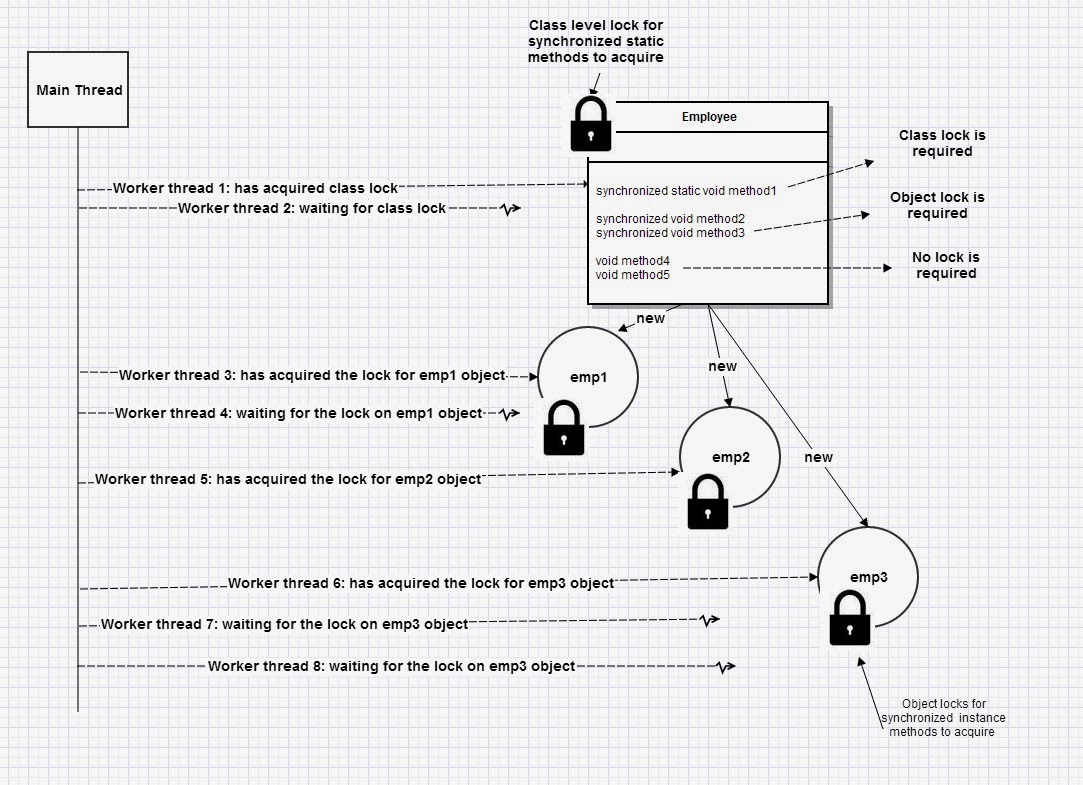
  2. If a method is declared as synchronized, then it will acquire either the instance intrinsic lock or the static intrinsic lock when it is invoked. The two types of lock have similar behavior, but are completely independent of each other.
  3. Acquiring the instance lock only blocks other threads from invoking a synchronized instance method. It does not block other threads from invoking an un-synchronized method, nor does it block them from invoking a static synchronized method.
  4. Any thread entering a synchronized  method or a block of code needs to acquire that object's or class's lock before entering to execute that method or block of code.
  5. Acquired lock is released when leaving a synchronized method or a block of code for other waiting or blocked threads to acquire.
  6. When an object has 1 or more synchronized methods or blocks of code, only one thread can acquire the lock for that object, all other threads will be blocked, and will be waiting to acquire the lock once released.
  7. When an object has 1 or more methods that are not synchronized, one or more threads can execute those methods or blocks of code simultaneously or concurrently. Threads are Not blocked, and waiting is not required.


Q. What does reentrancy mean regarding intrinsic or explcit locks?
A. Reentrancy means that locks are acquired on a per-thread rather than per-invocation basis.

public synchronized void method1(){
  //intrinsic lock is acquired
  operation1(); //ok to enter this synchronized method 
                //as locks are on per thread basis
  operation2(); //ok to enter this synchronized method 
                //as locks are on per thread basis 
  //intrinsic lock is released  
}

public synchronized void operation1(){
    //process 1
}

public synchronized void operation2(){
    //process 1
}


In Java, both intrinsic and explicit locks are re-entrant.

Q. If 2 different threads hit 2 different synchronized methods in an object at the same time will they both continue?
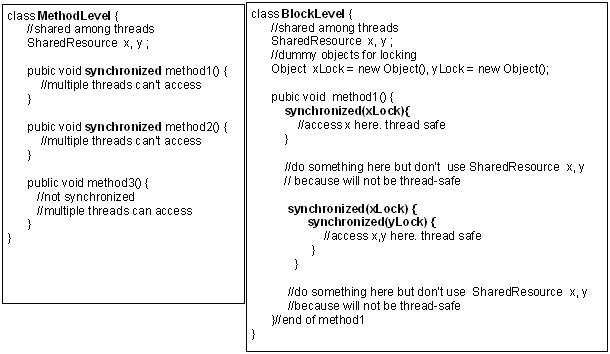
A. No. Only one thread can acquire the lock in a synchronized method of an object. Each object has a synchronization lock. No 2 synchronized methods within an object can run at the same time. One synchronized method should wait for the other synchronized method to release the lock.   This is demonstrated here with method level lock. Same concept is applicable for block level locks as well.


Q. Why synchronization is important?
A. Without synchronization, it is possible for one thread to modify a shared object while another thread is in the process of using or updating that object’s value. This often causes dirty data and leads to significant errors.

Q. What is the disadvantage  of synchronization?
A. The disadvantage of synchronization is that it can cause deadlocks when two threads are waiting on each other to do something. Also, synchronized code has the overhead of acquiring lock, and preventing concurrent access, which can adversely affect performance.


Q. When every object has an intrinsic lock in Java, why were explicit lock utility classes introduced in Java 5?
A. An intrinsic locking mechanism is a clean approach in terms of writing code, and is pretty good for most of the use-cases. But, intrinsic locking mechanism do have some limitations in certain scenarios:

  • It is not possible to have more control, for example, read concurrently when not writing.
  • Intrinsic locks must be released in the same block in which they are acquired.
  • It is not possible to interrupt a thread waiting to acquire a lock.
  • It is not possible to attempt to acquire a lock without waiting for it forever.


Q. How are explicit locks laid out in Java?
A. Laid out with 2 interfaces Lock and ReadWriteLock.


java.util.concurrent.locks.Lock – simplest case of a lock which can be acquired and released.

void lock();            //acquires the lock
void lockInterruptibly() throws InterruptedException; //acquires the lock unless current thread
                                                      //is interrupted
boolean tryLock();                                    //Acquires the lock only if it is free 
                                                      //at the time of invocation.
boolean tryLock(long time, TimeUnit unit) throws InterruptedException; //Acquires the lock if it
                                                                       //is free within the given 
                                                                       // waiting time 
                                                                       //and the current thread 
                                                                       //has not been interrupted


The implementation class of the above Lock interface is java.util.concurrent.locks.ReentrantLock, which has the same basic behavior and semantics as the intrinsic lock each Java object has.


java.util.concurrent.locks.ReadWriteLock – a lock implementation that has both read and write lock types – multiple read locks can be held at a time unless the exclusive write lock is held.

//returns the lock used for reading
Lock readLock();
//returns the lock used for writing.
Lock writeLock();


Q. What are the disadvantages of explicit locks?
A. It is more complicated to use it properly, and incorrect usage can lead to unexpected issues leading to deadlocks, thread starvation, etc. So, you need to remember the following best practices when using explicit locks.

  • Release the explicit locks in a finally block. 
  • Favor intrinsic locks where possible to avoid bugs and to keep your code cleaner and easier to maintain.
  • Use tryLock( ) if you don’t want a thread waiting indefinitely to acquire a lock. This is similar to how databases prevent dead locks with wait lock timeouts.
  • When using ReentrantLocks for frequent concurrent reads and occasional writes, be mindful of the possibility that a writer could wait a very long time sometimes forever) if there are constantly read locks held by other threads.

More beginner to advanced level multi-threading questions and answers 

Labels:

Jan 23, 2014

Java ExecutorService for multi-threading -- coding question and tutorial

Q. Can you code in Java for the following scenario?

Write a multi-threaded SumEngine, which takes  SumRequest with 2 operands (or input numbers to add) as shown below:

package com.mycompany.metrics;

import java.util.UUID;

public class SumRequest {
 
 private String id = UUID.randomUUID().toString();
 private int operand1;
 private int operand2;
 
 protected int getOperand1() {
  return operand1;
 }
 protected void setOperand1(int operand1) {
  this.operand1 = operand1;
 }
 protected int getOperand2() {
  return operand2;
 }
 protected void setOperand2(int operand2) {
  this.operand2 = operand2;
 }
 protected String getId() {
  return id;
 }
 
 @Override
 public String toString() {
  return "SumRequest [id=" + id + ", operand1=" + operand1 + ", operand2=" + operand2 + "]";
 } 
}

and returns a  SumResponse with a result.

package com.mycompany.metrics;

public class SumResponse {
 
 private String requestId;
 private int result;
 
 protected String getRequestId() {
  return requestId;
 }
 protected void setRequestId(String requestId) {
  this.requestId = requestId;
 }
 protected int getResult() {
  return result;
 }
 protected void setResult(int result) {
  this.result = result;
 }
 
 @Override
 public String toString() {
  return "SumResponse [requestId=" + requestId + ", result=" + result + "]";
 }
}

A. Processing a request and returning a response is a very common programming task. Here is a basic sample code to get started.This interface can take any type of object as request and response.

package com.mycompany.metrics;

/**
 * R -- Generic request type, S -- Generic response type 
 */
public interface SumProcessor<R,S> {
 
    abstract S sum(R request);
}

Step 1: Define the interface that performs the sum operation. Take note that generics is used .

package com.mycompany.metrics;

/**
 * R -- Generic request type, S -- Generic response type 
 */
public interface SumProcessor<R,S> {
 
    abstract S sum(R request);
}

Step 2: Define the implementation for the above interface. Takes SumRequest and returns SumResponse. 

package com.mycompany.metrics;

public class SumProcessorImpl<R,S> implements SumProcessor<SumRequest, SumResponse> {

 @Override
 public SumResponse sum(SumRequest request) {
  System.out.println(Thread.currentThread().getName() + " processing request .... " + request);
  SumResponse resp= new SumResponse();
  resp.setRequestId(request.getId());
  resp.setResult(request.getOperand1() + request.getOperand2());
  return resp;
 }
}

Step 3: Write the multi-threaded  SumEngine. The entry point is the public method execute(SumRequest... request ) that takes 1 or more SumRequest as input via varargs. ExecutorService is the thread pool and closure of Callable interface is the executable task that can be submitted to the pool to be executed by the available thread.


package com.mycompany.metrics;

import java.util.LinkedList;
import java.util.List;
import java.util.concurrent.Callable;
import java.util.concurrent.ExecutionException;
import java.util.concurrent.ExecutorService;
import java.util.concurrent.Executors;
import java.util.concurrent.Future;
import java.util.concurrent.atomic.AtomicInteger;

public class SumEngine {

private final AtomicInteger requestsCount = new AtomicInteger();

 ExecutorService executionService = null;

 //executes requests to sum
 public void execute(SumRequest... request) {
  executionService = Executors.newFixedThreadPool(5); //create a thread pool
  List<Callable<SumResponse>> tasks = createExecuteTasks(request);
  List<Future<SumResponse>> results = execute(tasks);
  for (Future<SumResponse> result : results) {

   try {
    System.out.println(Thread.currentThread().getName() + ": Response = " + result.get());
   } catch (InterruptedException e) {
    e.printStackTrace();
   } catch (ExecutionException e) {
    e.printStackTrace();
   }
  }
                 
   //initiates an orderly shutdown of thread pool
   executionService.shutdown();
 }

 //create tasks
 private List<Callable<SumResponse>> createExecuteTasks(SumRequest[] requests) {
  List<Callable<SumResponse>> tasks = new LinkedList<Callable<SumResponse>>();
  executingRequests(requests.length);
  for (SumRequest req : requests) {
   Callable<SumResponse> task = createTask(req);
   tasks.add(task);
  }

  return tasks;
 }

 //increment the requests counter
 private void executingRequests(int count) {
  requestsCount.addAndGet(count);
 }

 //creates callable (i.e executable or runnable tasks) 
 private Callable<SumResponse> createTask(final SumRequest request) {
  // anonymous implementation of Callable.
  // Pre Java 8's way of creating closures
  Callable<SumResponse> task = new Callable<SumResponse>() {

   @Override
   public SumResponse call() throws Exception {
    System.out.println(Thread.currentThread().getName() + ": Request = " + request);
    SumProcessor<SumRequest, SumResponse> processor = new SumProcessorImpl<>();
    SumResponse result = processor.sum(request);
    return result;
   }

  };

  return task;
 }

 //executes the tasks
 private <T> List<Future<T>> execute(List<Callable<T>> tasks) {

  List<Future<T>> result = null;
  try {
   //invokes the sum(sumRequest) method by executing the closure call() inside createTask
   result = executionService.invokeAll(tasks);
  } catch (InterruptedException e) {
   e.printStackTrace();
  }

  return result;

 }
 
 public int getRequestsCount(){
  return requestsCount.get();
 }
}

Step 4: Write the SumEngineTest to run the engine with the main method. Loops through numbers 1 to 5 and adds each consecutive numbers like 1+2=3, 2+3=5, 3+4=7, 4+5=9, and 5+6 = 11.

package com.mycompany.metrics;

import java.util.ArrayList;
import java.util.List;

public class SumEngineTest {

 public static void main(String[] args) throws Exception {

  SumEngine se = new SumEngine();
  
  List<SumRequest> list = new ArrayList<>();

  // sums 1+2, 2+3, 3+4, etc
  for (int i = 1; i <= 5; i++) {
   SumRequest req = new SumRequest();
   req.setOperand1(i);
   req.setOperand2(i + 1);
   list.add(req);
  }

  SumRequest[] req = new SumRequest[list.size()];
  se.execute((SumRequest[]) list.toArray(req));

 }
}

The output is:

pool-1-thread-2: Request = SumRequest [id=bca23e97-3a6f-4e42-aff4-5ed5f7de2783, operand1=2, operand2=3]
pool-1-thread-4: Request = SumRequest [id=36d95b35-09f0-4e93-99e4-715ea7cb33c9, operand1=4, operand2=5]
pool-1-thread-3: Request = SumRequest [id=31ccd137-349a-4b7a-93b1-e51f62c11ba9, operand1=3, operand2=4]
pool-1-thread-1: Request = SumRequest [id=4bfa782a-c695-4de6-9593-cbfd357c3535, operand1=1, operand2=2]
pool-1-thread-5: Request = SumRequest [id=c653f469-6a6f-45b6-99f2-ed58620fd144, operand1=5, operand2=6]
pool-1-thread-4 processing request .... SumRequest [id=36d95b35-09f0-4e93-99e4-715ea7cb33c9, operand1=4, operand2=5]
pool-1-thread-2 processing request .... SumRequest [id=bca23e97-3a6f-4e42-aff4-5ed5f7de2783, operand1=2, operand2=3]
pool-1-thread-1 processing request .... SumRequest [id=4bfa782a-c695-4de6-9593-cbfd357c3535, operand1=1, operand2=2]
pool-1-thread-3 processing request .... SumRequest [id=31ccd137-349a-4b7a-93b1-e51f62c11ba9, operand1=3, operand2=4]
pool-1-thread-5 processing request .... SumRequest [id=c653f469-6a6f-45b6-99f2-ed58620fd144, operand1=5, operand2=6]
main: Response = SumResponse [requestId=4bfa782a-c695-4de6-9593-cbfd357c3535, result=3]
main: Response = SumResponse [requestId=bca23e97-3a6f-4e42-aff4-5ed5f7de2783, result=5]
main: Response = SumResponse [requestId=31ccd137-349a-4b7a-93b1-e51f62c11ba9, result=7]
main: Response = SumResponse [requestId=36d95b35-09f0-4e93-99e4-715ea7cb33c9, result=9]
main: Response = SumResponse [requestId=c653f469-6a6f-45b6-99f2-ed58620fd144, result=11]

Labels: ,

Jan 9, 2014

When and How to use Java ThreadLocal class?

Q. What is a ThreadLocal class?
A. ThreadLocal is a handy class for simplifying development of thread-safe concurrent programs by making the object stored in this class not sharable between threads. ThreadLocal class encapsulates non-thread-safe classes to be safely used in a multi-threaded environment and also allows you to create per-thread-singleton.


Q. Are there any alternatives to using an object or resource pool to conserve memory in Java?
A. Yes, you can use a ThreadLocal object to create an object per thread. This approach is useful when creation of a particular object is not trivial and the objects cannot be shared between threads. For example, java.util.Calendar and java.text.SimpleDateFormat. Because these are heavy objects that often need to be set up with a format or locale, it’s very tempting to create it with a static initializer and stick the instance in a static field. Both of these classes use internal mutable state when doing date calculations or formatting/parsing dates. If they are called from multiple threads at the same time, the internal mutable state will most likely do unexpected things and  give you wrong answers. In simple terms, this will cause thread-safety issues that can be very hard to debug.

Q. Are SimpleDateFormat and DecimalFormat classes thread-safe in Java?
A. No.

Q. How will you you use them in a thread-safe manner?
A. Declare it either as a local variable or use the anonymous ThreadLocal  inner class if you want to use it across a number of different methods within the class as shown below.


package test.example;

import java.math.BigDecimal;
import java.text.DateFormat;
import java.text.DecimalFormat;
import java.text.NumberFormat;
import java.text.SimpleDateFormat;
import java.util.Date;

public class InvestmentBalance {

 private static final ThreadLocal<NumberFormat> PERCENT_FORMAT = new ThreadLocal<NumberFormat>() {
  @Override
  protected NumberFormat initialValue() {
   return new DecimalFormat("###.##");
  }
 };

 private static final ThreadLocal<NumberFormat> DOLLAR_FORMAT = new ThreadLocal<NumberFormat>() {
  @Override
  protected NumberFormat initialValue() {
   return new DecimalFormat("$#,###.####");
  }
 };
 
 private static final ThreadLocal<DateFormat> DATE_FORMAT = new ThreadLocal<DateFormat>() {
  @Override
  protected DateFormat initialValue() {
   return new SimpleDateFormat("dd/MMM/yyyy");
  }
 };
 
 
 public String getPercentageOfInvAmount(BigDecimal amount) {
  return PERCENT_FORMAT.get().format(amount.doubleValue()) + "%";
 }

 public String getDollarInvAmount(BigDecimal amount) {
  return DOLLAR_FORMAT.get().format(amount.doubleValue());
 }
 
 public String getFormattedExpiryDate(Date date) {
  return DATE_FORMAT.get().format(date);
 }

}

The class with the main method


package test.example;

import java.math.BigDecimal;

import org.joda.time.DateTime;

import static java.lang.System.out;

public class InvestmentBalanceTest {
 
 private static final DateTime dt;
 
 static {
   dt = new DateTime(2005, 3, 26, 12, 0, 0, 0);
 }
 
 public static void main(String[] args) {
  InvestmentBalance ib = new InvestmentBalance();
  
  BigDecimal percent = new BigDecimal(35.479);
  percent.setScale(2, BigDecimal.ROUND_HALF_EVEN);
  
  BigDecimal amount = new BigDecimal(3525.49423);
  amount.setScale(4, BigDecimal.ROUND_HALF_EVEN);
  
  out.println(ib.getPercentageOfInvAmount(percent));
  out.println(ib.getDollarInvAmount(amount));
  out.println(ib.getFormattedExpiryDate(dt.toDate()));
 }

}

Output:


35.48%
$3,525.4942
26/Mar/2005

Labels: ,

Nov 25, 2013

Java FutureTask example

Java 5 introduced the concurrent package for more efficient multi-threading. The executor framework and callable/Future interfaces were covered in the post entitled

Java 5 Executor framework

Q. What is the difference between Future and FutureTask in asynchronous processing?
A. Future is the interface and FutureTask is the base implementation of the Future with methods to start and cancel a computation. The FutureTask provides asynchronous computation with methods to start and cancel a computation, query to see if the computation is complete, and retrieve the result of the computation. The result can only be retrieved when the computation has completed. The get method will block if the computation has not yet completed. Once the computation has completed, the computation cannot be restarted or cancelled.

Here is an example with 2 tasks. One is an internal short task that takes ~1 second. The second task is an external long running task taking 4 ~ 10 seconds. It is imperative that long running tasks need to have proper processing timeouts.


import java.util.concurrent.Callable;
import java.util.concurrent.ExecutionException;
import java.util.concurrent.ExecutorService;
import java.util.concurrent.Executors;
import java.util.concurrent.FutureTask;
import java.util.concurrent.TimeUnit;
import java.util.concurrent.TimeoutException;

public class FutureTaskExample {

 // inner class
 static class InternalProcess implements Callable&t;Integer> {

  @Override
  public Integer call() throws Exception {
   
   // just to simulate short internal process
   TimeUnit.SECONDS.sleep(1);
   return 2;
  }

 }

 // inner class
 static class ExternalProcess implements Callable&t;Integer> {

  @Override
  public Integer call() throws Exception {
   // just to simulate long running external process
   TimeUnit.SECONDS.sleep(15);
   return 12;
  }
 }

 public static void main(String[] args) {
  InternalProcess callable1 = new InternalProcess();
  ExternalProcess callable2 = new ExternalProcess();

  FutureTask&t;Integer> futureTask1 = new FutureTask&t;Integer>(callable1);
  FutureTask&t;Integer> futureTask2 = new FutureTask&t;Integer>(callable2);

  // create a fixed thread pool with 2 threads
  ExecutorService executor = Executors.newFixedThreadPool(2);
  // add future tasks to the pool
  executor.execute(futureTask1);
  executor.execute(futureTask2);

  while (true) {
   try {
    if (futureTask1.isDone() && futureTask2.isDone()) {
     System.out.println("Shutting down the executor.");
     // shut down executor service
     executor.shutdown();
     return;
    }

    //if not done do it once
    if (!futureTask1.isDone()) {
     // wait indefinitely for future task to complete
     System.out.println("Task1 output = "
       + futureTask1.get());
    }

    System.out.println("Waiting for FutureTask2 to complete");
    //try the external task with the timeout of 5 seconds
    Integer result = futureTask2.get(5, TimeUnit.SECONDS);
    if (result != null) {
     System.out.println("Task2 output = " + result);
    }
   } catch (InterruptedException ie) {
    ie.printStackTrace();
   } catch (TimeoutException e) {
    // do nothing as we want to process it asynchronously
    // if you want to time out then uncomment 2 lines
    
    //System.out.println("Cancelling Task2 due to timeout");
    //futureTask2.cancel(true); // true means interrupt
   } catch (ExecutionException e) {
    e.printStackTrace();
   }
  }
 }

}


The output is

 
Task1 output = 2
Waiting for FutureTask2 to complete
Task2 output = 12
Shutting down the executor.


If you re-run it by uncommenting the last 2 lines in the TimeoutException catch block, you will get task2 cancelled.

 
Task1 output = 2
Waiting for FutureTask2 to complete
Cancelling Task2 due to timeout
Shutting down the executor.

Labels:

Sep 19, 2013

30+ Core Java multithreading interview questions and answers

Java Multi-threading Interview Questions and Answers

Beginner Q&A More beginner Q&A Beginner locks Beginner thread communication Beginner thread sequencing Intermediate Q&A Volatile variable
Advanced Q&A Printing odd and even numbers Thread pools ExecutorService Atomic operations CountDownLatch and CyclicBarrier Semaphores and mutexes

Q. Why do interviewers like multi-threading interview questions?
A. Because it is not easy, but very essential to write scalable and high throughput systems.

If you are going for Java interviews to work on large scale systems,  expect multi-threading interview questions. These are more beginner or fresher level questions and if you are already good with the basics, try more intermediate to advanced level coding questions and answers on Java multi-threading at Java multi-threading-1  |   Java multi-threading-2

Q. What is the difference between processes and threads?
A. A process is an execution of a program but a thread is a single execution sequence within the process. A process can contain multiple threads. A thread is sometimes called a lightweight process.


A JVM runs in a single process and threads in a JVM share the heap belonging to that process. That is why several threads may access the same object. Threads share the heap and have their own stack space. This is how one thread’s invocation of a method and its local variables are kept thread safe from other threads. But the heap is not thread-safe and must be synchronized for thread safety.

Q. Explain different ways of creating a thread?
A. Threads can be used by either
  • Extending the Thread class.
  • Implementing the Runnable interface.
  • Using the Executor framework (this creates a thread pool) 


class Counter extends Thread {
   
    //method where the thread execution will start 
    public void run(){
        //logic to execute in a thread    
    }

    //let’s see how to start the threads
    public static void main(String[] args){
       Thread t1 = new Counter();
       Thread t2 = new Counter();
       t1.start();  //start the first thread. This calls the run() method.
       t2.start(); //this starts the 2nd thread. This calls the run() method.  
    }
} 


class Counter extends Base implements Runnable{
  
    //method where the thread execution will start 
    public void run(){
        //logic to execute in a thread    
    }

    //let us see how to start the threads
    public static void main(String[] args){
         Thread t1 = new Thread(new Counter());
         Thread t2 = new Thread(new Counter());
         t1.start();  //start the first thread. This calls the run() method.
         t2.start();  //this starts the 2nd thread. This calls the run() method.  
    }
} 

The thread pool is more efficient and  learn why and how to create pool of  threads using the executor framework.

Q. Which one would you prefer and why?
A. The Runnable interface is preferred, as it does not require your object to inherit a thread because when you need multiple inheritance, only interfaces can help you. In the above example we had to extend the Base class so implementing Runnable interface is an obvious choice. Also note how the threads are started in each of the different cases as shown in the code sample. In an OO approach you should only extend a class when you want to make it different from it’s superclass, and change it’s behavior. By implementing a Runnable interface instead of extending the Thread class, you are telling to the user that the class Counter is an object of type Base and will run as a thread.


Q. Briefly explain high-level thread states?
A. The state chart diagram below describes the thread states.

  • Runnable — A thread becomes runnable when you call the start( ), but does  not necessarily start running immediately.  It will be pooled waiting for its turn to be picked for execution by the thread scheduler based on thread priorities.

    MyThread aThread = new MyThread();
    aThread.start();                   //becomes runnable
    
  • Running: The processor is actively executing the thread code. It runs until it becomes blocked, or voluntarily gives up its turn with this static method Thread.yield( ). Because of context switching overhead, yield( ) should not be used very frequently
  • Waiting: A thread is in a blocked state while it waits for some external processing such as file I/O to finish.A call to currObject.wait( ) method causes the current thread to wait until some other thread invokes currObject.notify( ) or the currObject.notifyAll( ) is executed.
  • Sleeping: Java threads are forcibly put to sleep (suspended) with this overloaded method: Thread.sleep(milliseconds), Thread.sleep(milliseconds, nanoseconds);
  • Blocked on I/O: Will move to runnable after I/O condition like reading bytes of data etc changes.
  • Blocked on synchronization: will move to running when a lock is acquired. 
  • Dead: The thread is finished working.
Thread.State enumeration contains the possible states of a Java thread in the underlying JVM. These thread states are possible due to Java's following thread concepts:
  • The objects can be shared and modified (i.e. if mutable) by any threads.
  • The preemptive nature of the thread scheduler can swap threads on and off cores in a multi-core CPU machine at any time.
  • This means the methods can be swapped out while they are running. Otherwise a method in an infinite loop will clog the CPU forever leaving the other methods on different threads to starve. 
  • To prevent thread safety issues, the methods and block of code that has vulnerable data can be locked
  • This enables the threads to be in locked or waiting to acquire a lock states. 
  • The threads also get into the waiting state for I/O resources like sockets, file handles, and database connections. 
  • The threads that are performing I/O read/write operations can not be swapped. Hence, they need to either complete to the finished state with success/failure or another thread must close the socket for it to get to the state of dead or finished. This is why proper service timeout values are necessary to prevent the thread to get blocked for ever in an I/O operation, causing performance issues. 
  • The threads can be put to sleep to give other threads in waiting state an opportunity to execute.


Q. What is the difference between yield and sleeping? What is the difference between the methods sleep( ) and wait( )?
A. When a task invokes yield( ), it changes from running state to runnable state. When a task invokes sleep ( ), it changes from running state to waiting/sleeping state.

The method wait(1000) causes the current thread to wait up to one second a signal from other threads. A thread could wait less than 1 second if it receives the notify( ) or notifyAll( ) method call. The call to sleep(1000) causes the current thread to sleep for t least 1 second.

Q. Why is locking of a method or block of code for thread safety is called "synchronized" and not "lock" or "locked"?
A. When a method or block of code is locked with the reserved "synchronized" key word in Java, the memory (i.e. heap) where the shared data is kept is synchronized. This means,

  • When a synchronized block or method is entered after the lock has been acquired by a thread, it first reads any changes to the locked object from the main heap memory to ensure that the thread that has the lock has the current info before start executing.
  • After the synchronized  block has completed and the thread is ready to relinquish the lock, all the changes that were made to the object that was locked is written or flushed back to the main heap memory so that the other threads that acquire the lock next has the current info.

This is why it is called "synchronized" and not "locked". This is also the reason why the immutable objects are inherently thread-safe and does not require any synchronization. Once created, the immutable objects cannot be modified.

Q. How does thread synchronization occurs inside a monitor? What levels of synchronization can you apply? What is the difference between synchronized method and synchronized block?
A. In Java programming, each object has a lock. A thread can acquire the lock for an object by using the synchronized keyword. The synchronized keyword can be applied in method level (coarse grained lock – can affect performance adversely) or block level of code (fine grained lock). Often using a lock on a method level is too coarse. Why lock up a piece of code that does not access any shared resources by locking up an entire method. Since each object has a lock, dummy objects can be created to implement block level synchronization. The block level is more efficient because it does not lock the whole method.


The JVM uses locks in conjunction with monitors. A monitor is basically a guardian who watches over a sequence of synchronized code and making sure only one thread at a time executes a synchronized piece of code. Each monitor is associated with an object reference. When a thread arrives at the first instruction in a block of code it must obtain a lock on the referenced object. The thread is not allowed to execute the code until it obtains the lock. Once it has obtained the lock, the thread enters the block of protected code. When the thread leaves the block, no matter how it leaves the block, it releases the lock on the associated object. For static methods, you acquire a class level lock.

More Interview Q&A on Java multithreading:

Beginner:
Intermediate to Advanced

Articles on Java 5 concurrent package


Labels:

Aug 28, 2013

Deadlock Retry with JDK Dynamic Proxy

Here are the key steps in writing a dead lock retry service with JDK Dynamic Proxy.

Step 1: Define the custom deadlock retry annotation.

package com.myapp.deadlock;

import java.lang.annotation.ElementType;
import java.lang.annotation.Inherited;
import java.lang.annotation.Retention;
import java.lang.annotation.RetentionPolicy;
import java.lang.annotation.Target;

@Retention(RetentionPolicy.RUNTIME)
@Target(ElementType.METHOD)
@Inherited
public @interface DeadlockRetry
{
    int maxTries() default 10;
    
    int tryIntervalMillis() default 1000;
}


Step 2: Define the JDK dynamic proxy class.


package com.myapp.deadlock;

import java.lang.annotation.Annotation;
import java.lang.reflect.InvocationHandler;
import java.lang.reflect.Method;

import org.slf4j.Logger;
import org.slf4j.LoggerFactory;


public class DeadlockRetryHandler implements InvocationHandler
{
    
    private static final Logger LOG = LoggerFactory.getLogger(DeadlockRetryHandler.class);
    
    private Object target;
    
    public DeadlockRetryHandler(Object target)
    {
        this.target = target;
    }
    
    @Override
    public Object invoke(Object proxy, Method method, Object[] args) throws Throwable
    {
        
        Annotation[] annotations = method.getAnnotations();
        
        DeadlockRetry deadlockRetry = (DeadlockRetry) annotations[0];
        
        final Integer maxTries = deadlockRetry.maxTries();
        long tryIntervalMillis = deadlockRetry.tryIntervalMillis();
        
        int count = 0;
        
        do
        {
            try
            {
                count++;
                LOG.info("Attempting to invoke method " + method.getName() + " on " + target.getClass() + " count "
                        + count);
                Object result = method.invoke(target, args);    // retry
                LOG.info("Completed invocation of method " + method.getName() + " on " + target.getClass());
                return result;
            }
            catch (Throwable e)
            {
                if (!DeadlockUtil.isDeadLock(e))
                {
                    throw new RuntimeException(e);
                }
                
                if (tryIntervalMillis > 0)
                {
                    try
                    {
                        Thread.sleep(tryIntervalMillis);
                    }
                    catch (InterruptedException ie)
                    {
                        LOG.warn("Deadlock retry thread interrupted", ie);
                    }
                }
            }
        }
        while (count <= maxTries);
        
        //gets here only when all attempts have failed
        throw new RuntimeException("DeadlockRetryMethodInterceptor failed to successfully execute target "
                + " due to deadlock in all retry attempts",
                new DeadlockDataAccessException("Created by DeadlockRetryMethodInterceptor", null));
        
    }
    
}


Step 3: The utility class used by the dynamic proxy to determine if the exception indicates deadlock.

package com.myapp.deadlock;

import org.apache.commons.lang.exception.ExceptionUtils;
import org.springframework.dao.CannotAcquireLockException;

public final class DeadlockUtil
{  
    public static final String DEADLOCK_MSG = "encountered a deadlock situation. Please re-run your command.";
    
    static boolean isDeadLock(Throwable throwable)
    {
        boolean isDeadLock = false;
        
        Throwable[] causes = ExceptionUtils.getThrowables(throwable);
        for (Throwable cause : causes)
        {
            if (cause instanceof CannotAcquireLockException || (cause.getMessage() != null
                    && (cause.getMessage().contains("LockAcquisitionException") || cause.getMessage().contains(
                    DEADLOCK_MSG))))
            
            {
                isDeadLock = true;
                return isDeadLock;
            }
        }
        
        return isDeadLock;
    }
    
}


Step 4: Define the target object interface with the annotation.

package com.myapp.engine;

import com.myapp.DeadlockRetry;


public interface AccountServicePersistenceDelegate
{
    @DeadlockRetry(maxTries = 10, tryIntervalMillis = 5000)
    abstract Account getAccount(String accountNumber);
}


Step 5: Define the target object implementaion.

package com.myapp.engine;

import com.myapp.dao.AccountDAO;
...

import javax.annotation.Resource;
import org.springframework.stereotype.Repository;

@Repository
public class AccountServicePersistenceDelegateImpl implements AccountServicePersistenceDelegate
{
    
    @Resource(name = "accountDao")
    private AccountDAO accountDAO;
    
    public Account getStatementOfNetAsset(String accountNumber)
    {
        Account account = accountDAO.getAccount(String accountNumber);
        return account;
    }   
}


Step 6: Invoke the target via the proxy.

...
@Component("accountService")
@ThreadSafe
public class AccountServiceImpl implements AccountService
{

    @Resource
    private AccountServicePersistenceDelegate asServicePersistenceDelegate;
    
    private AccountServicePersistenceDelegate proxyAsPersistenceDelegate;

    @PostConstruct
    public void init()
    {
        this.proxyAsPersistenceDelegate = (AccountServicePersistenceDelegate) Proxy
                .newProxyInstance(AccountServicePersistenceDelegate.class.getClassLoader(), new Class<?>[]
                {AccountServicePersistenceDelegate.class}, 
    new DeadlockRetryHandler(asServicePersistenceDelegate));
    }
 
 public void processAccount(String accountNumber) {
     //...
     Account account = proxyAsPersistenceDelegate.getAccount(accountNumber); // invokes the target via the proxy
  //............
 }
}


Other design patterns - real life examples

Labels: ,