Google

Apr 9, 2013

JavaScript Tutorial -- coding and debugging with FireBug

Step 1: Download and install Mozilla Firefox (latest available version). Also install the add on FireBug. Two other handy add on plugins for the FireBug are YSlow and Cookies.


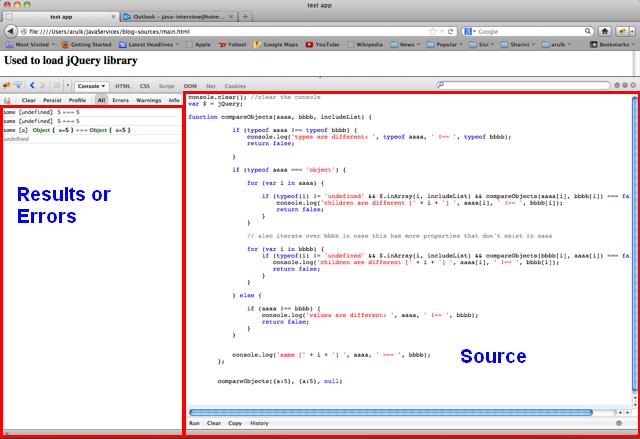
The small  "Split Screen Screen" button in FireBug as shown above will allow you to have a split screen. You can use the right hand side screen to type in you JavaScript code and execute it. The  left hand side screen can be used for displaying the console.log statements and errors. 

FireBug is a very handy tool to inspect your DOM elements and CSS styles. You can also add break points to your JavaScript for debugging. The FireBug can be turned on and off with the F12 button.Google chrome has similar development tools and you can bring it on with the F12 key.

Step 2: The tutorial below uses bot JavaScript and jQuery. Firsly you need a basic HTML file that downloads the jQuery library and sets the context to write jQuery code. Here is main.html page.

<html lang="en" >
<head>
   
    <title>test app</title>

   <script type="text/javascript" src="http://ajax.googleapis.com/ajax/libs/jquery/1.9.1/jquery.min.js?ver=1.9.1"></script>                                                                 
 </head>             

  
<body>

    <h2>Used to load  jQuery library</h2>   

</body>
</html>


Step 3: Here is the sample function that uses both jQuery and JavaScript as shown below. This function compares two objects or values and checks if  both objects or values are same. It returns either true or false as the return value. This function is not fully tested and used for illustration purpose only. Feel free to try different scenarios and fix any issues that arise.

console.clear();

var $ = jQuery;

       function compareObjects(aaaa, bbbb, includeList) {
            if (typeof aaaa !== typeof bbbb) {
                console.log('types are different: ', typeof aaaa, ' !== ', typeof bbbb);
                return false;
            }
            if (typeof aaaa === 'object') {
                for (var i in aaaa) {
                    if (typeof(i) != 'undefined' && $.inArray(i, includeList) && compareObjects(aaaa[i], bbbb[i]) === false) {
                        console.log('children are different [' + i + '] ', aaaa[i], ' !== ', bbbb[i]);
                        return false;
                    }
                }
                // also iterate over bbbb in case this has more properties that don't exist in aaaa
                for (var i in bbbb) {
                    if (typeof(i) != 'undefined' && $.inArray(i, includeList) && compareObjects(bbbb[i], aaaa[i]) === false) {
                       console.log('children are different [' + i + '] ', aaaa[i], ' !== ', bbbb[i]);
                       return false;
                    }
                }
            } else {
                if (aaaa !== bbbb) {
                    console.log('values are different: ', aaaa, ' !== ', bbbb);
                    return false;

                }
            }
            console.log('same [' + i + '] ', aaaa, ' === ', bbbb);
            return true;
        };


compareObjects({a:5}, {a:5}, null)


Step 4: Invoke the  The above code can be typed in the FireBug console as shown below for debugging and execution.


Now, you can follow the above steps to write a JavaScript function and debug the function using FireBug. Also try using the FireBug to inspect HTML and CSS code by clicking on the respective tabs. The Script tab is also used for placing break points and debugging JavaScript.

Labels: ,

Feb 27, 2013

JavaScript Coding Questions and Answers


Q. Can you write JavaScript Utils functions for the given scenarios?

Scenario 1: Generate random numbers to break cache in restful service calls? For example, the random numbers can be added as a query parameter to break cache.


function Utils() {

    this.cacheBreaker = function () {
            return ((new Date()).getTime() + '').substr(2,8);   // A string that is different every second
    };
}


Scenario 2: Convert Date format from "YYYYMMDD" to "DD/MM/YYYY". The following examples use regular expressions

function Utils() {

    //For example, from JSON data format YYYYMMDD to GUI display format DD/MM/YYYY. 
    this.dateConvertRestToUser = function (dateInput) {
        var m = dateInput.match(/^([1-9][0-9]{3})([0-9]{2})([0-9]{2})$/);
        if (m) {
            return m[3] + '/' + m[2] + '/' + m[1];
        }
      return null;
    };
 
 //For example, from GUI display format DD/MM/YYYY to JSON data format YYYYMMDD
 this.dateConvertUserToRest = function (dateInput) {
        var m = dateInput.match(/^ *([0-3]?[0-9])\/([0-1]?[0-9])\/([1-2][0-9][0-9][0-9]) *$/);
        if (m) {
            var day = m[1];
            var month = m[2];
            var year = m[3];

            if (day.length == 1) {
                day = '0' + day;
            }
            if (month.length == 1) {
                month = '0' + month;
            }
            return year + month + day;
        }
        return null;
    };
}


Scenario 3: Get the attribute value for a given HTML element and attribute.

function Utils() {

    this.getAttrString = function (attr, element) {
         var attrValue = element.attr(attr);
         if (attrValue && attrValue.length > 0) {
            return attrValue;
         }
        return null;
    };
}


Scenario 4: Extract HTML value form a given tag.

function Utils() {

    this.extractHTMLValue = function (html, tag) {
        var htmlValue = "";

        if (tag != null && html != null) {
            var beginTag = "<" + tag.toUpperCase() + ">";
            var endTag = "</" + tag.toUpperCase() + ">";

            html = html.toUpperCase();

            var beginIndex = html.indexOf(beginTag);
            var endIndex = html.indexOf(endTag);

           if (beginIndex > -1 && endIndex > -1 && endIndex > beginIndex) {
                htmlValue = html.substring(beginIndex + beginTag.length, endIndex);
            }
        }

        return htmlValue;
    };
 
}


Scenario 5: Logging from your JavaScriot at different log levels like debug, info, warn, and error.

function PortalLog(logLevel) {
     
        if (typeof console != 'object' || (typeof console.log != 'function' && typeof console.log != 'object')) {
            logLevel = 4;
        }

        function evalLog(type, args) {
            var evalLog = '';
            for (var i = 0; i < args.length; i++) {
                if (i > 0) {
                    evalLog += ',';
                }
                evalLog += 'args[' + i + ']';
            }
            return eval('console.' + type + '(' + evalLog + ');');
        }

        if (logLevel <= 0) {
            this.log = function () {
                return evalLog('log', arguments);
            }
            this.debug = this.log;
        } else {
            this.log = function () {};
            this.debug = function () {};
        }

        if (logLevel <= 1) {
            this.info = function () {
                return evalLog('info', arguments);
            }
        } else {
            this.info = function () {};
        }

        if (logLevel <= 2) {
            this.warn = function () {
                return evalLog('warn', arguments);
            }
        } else {
            this.warn = function () {};
        }

        if (logLevel <= 3) {
            this.error = function () {
                return evalLog('error', arguments);
            }
        } else {
            this.error = function () {};
        }

}


Q. What’s the difference between these two statements?

var x = 3;

x = 3;


A. The first statement puts the variable in the scope of whatever function it was defined. The second statement places the variable in global scope. Global scope can potentially cause collision with other variables with the same name. Therefore, the keyword var must be used when defining variables, and an anonymous function should be used as a closure if needed, encapsulating multiple functions which can share access to the same set of variables. That makes sure the variables stay sandboxed, accessible only by those functions which need them.

Q. What is the difference between the following 2 statements?

!!(obj1 && obj2);

(obj1 && obj2);


A. The first statement returns a “real” boolean value, because you first negate what is inside the parenthesis, but then immediately negate it again. So, this is like saying something is “not not” truth-a, making it true. The second example simply checks for the existence of the obj1 and obj2, but might not necessarily return a “real” boolean value, instead returning something that is either truth-a or false-a. This can be problematic, because false-a can be the number 0, or an empty string, etc. Simple existence can be truth-a. A “real” boolean will only be true or false.

Labels:

Jul 27, 2012

JavaScript common mistakes and tools

If you are writing Java Script code, it is worth using code quality tools like JSLint and JSHint  to avoid any pitfalls like

  • using global variables
  • leaving trailing commas in object declarations
  • not understanding the difference between closures and functions
  • forgetting to declare a var
  • naming a variable with the same name as an HTML id, etc.

It is also essential to use JavaScript testing frameworks like Jasmine, Selenium + WebDriver, QUnit, and TestSwarm. QUnit is an easy-to-use, JavaScript test suite that was developed by the jQuery project to test its code and plugins, but is capable of testing any generic JavaScript code. One of the challenges of JavaScript rich application is testing it for cross  browser compatibility. The primary goal of TestSwarm is to simplify the complicated, and time-consuming process of running JavaScript test suites in multiple browsers. It provides all the tools necessary for creating a continuous integration work-flow for your JavaScript rich application. Debugging JavaScripts can be a painful part of web development. There are handy browser plugins, built-ins and external tools to make your life easier. Here are a few such tools.

  • Cross-browser (Firebug Lite, JS Shell, Fiddler, Blackbird Javascript Debug helper, NitobiBug, DOM Inspector (aka DOMi), Wireshark / Ethereal)
  • Firefox (JavaScript Console, Firebug, Venkman, DOM Inspector, Web Developer Extension, Tamper Data, Fasterfox, etc)
  • Internet Explorer (JavaScript Console, Microsoft Windows Script Debugger, Microsoft Script Editor, Visual Web Developer, Developer Toolbar, JScript Profiler, JavaScript Memory Leak Detector)
  • Opera (JavaScript Console, Developer Console, DOM Snapshot, etc)
  • Safari ("Debug" menu, JavaScript Console, Drosera - Webkit, etc)
  • Google Chrome (JavaScript Console and Developer Tools)

Q. What are the common JavaScript errors or bad practices that you have noticed
A.

1. Not using the var to declare your variables. If you don't use "var", your variable will become global. Your code will work with global variables, but it can create strange errors that are harder to debug and fix. It is also imperative to define proper namespaces and declare variables within the scope of that namespace.


Here is an example of global window scope and a neatly packaged "name" variable and "greet" function into an object literal. You can also note that the value of 'this' is changed to the containing object, which is no longer the global "window" object. This is quite useful as you can keep a set of variables and functions abstracted into one namespace without any potential conflicts of names.

<html>
<head>
<meta http-equiv="Content-Type" content="text/html; charset=ISO-8859-1">
<title>Insert title here</title>


<script type="text/javascript">

    //bad - global variable and function

    window.name= "window-global-scope";   //global scope

    var greet = function(greeting) {
     console.log(greeting + " " + this.name);
   }

   //good: encapsulated variable and function
   object = {
        name: "object-scope",
        
     greet: function(greeting) {
      console.log(greeting + " " + this.name);
        }
    }


</script>

</head>
<body onload="greet('hello');object.greet('howdy')">

</body>
</html>


Note: It is a best practice to define your HTML and Javascript in separate files. The above code snippet is for illustration purpose only.

The output will be

hello window-global-scope
howdy object-scope


2. Not understanding the difference between "==" operator and "===" operator. 
  • ==  operator compare the values but it doesn’t compare the data type of operands. 
  • === operator in JavaScript compare not only the value of operands, but also the data type. If the data type of operands is different, it will always return false.
3. Not de-referencing a variable once it has been used. Setting a variable to null once it has been used will allow the garbage collector of the js engine to reclaim that object. 

4. Not understanding the difference between innerText and innerHTML. The innerHTML gets the html code inside the element and innerText gets the text inside the element. So, if you had <p> Some text </p> the innerText will only return "Some text" without the element <p>, and innerHTML will return  <p> Some text </p>  

5.  Not understanding what the implicit scope "this" refers to. For example,


function  Account(balance) {
 this.balance = balance;
 this.getTenPercentOfbalance = function() {
      return balance * 0.10;
 };
}


var mortgageAccount = new Account(10000.00);
mortgageAccount.getTenPercentOfbalance(); // returns 1000.00


Now, if you try

var tenPercentMethod = mortgageAccount.getTenPercentOfbalance();
tenPercentMethod();  // throws an error


Why did it throw an error?

The implicit "this" points to the global Window object, and the Window object does not have the function getTenPercentOfbalance( ).

The above two lines can be written with the JavaScript head object 'window' as shown below.

  var window.tenPercentMethod = window.mortgageAccount.getTenPercentOfbalance();
  window.tenPercentMethod();  // throws an error


Important: The value of this, passed to all functions, is based on the context in which the function is called at runtime.

You can fix this by

tenPercentMethod.apply(mortgageAccount); // now it uses this == mortgageAccount


When invoking constructors with the 'new' keyword, 'this' refers to the “object that is to be” when the constructor function is invoked using the new keyword. Had we not used the new keyword above, the value of this would be the context in which Account is invoked — in this case the 'window' head object.

var mortgageAccount =  Account(10000.00); // without new key word. this is passed to the constructor as 'window'.  
console.log(mortgageAccount.balance); // undefined, the value is actually set at window.balance


'this' in nested functions

You might be wondering what happens to 'this' when it is used inside of a function that is contained inside of another function. The bad news is in ECMA 3, this loses its way and refers to the head object (window object in browsers), instead of the object within which the function is defined. The good news is that this will be fixed in ECMAScript 5.

Here is another example on this reference and scope: In JavaScript, scope is resolved during execution of functions. If you have nested functions, once you have executed a function nested within a function, JavaScript has lost your scope and is defaulting to the best thing it can get, window (i.e. global). To get your scope back, JavaScript offers you two useful functions, call and apply.


<html>
<head>
<meta http-equiv="Content-Type" content="text/html; charset=ISO-8859-1">
<title>Insert title here</title>


<script type="text/javascript">
   object = {
        name: "object-scope",
        
     greet: function() {
      nestedGreet =  function(greeting) {
           console.log(greeting + " " + this.name);
            }
   
      
      //scope is resolved during execution of functions
            nestedGreet('hello');                 //hello window-global-scope
                                                  //loses its scope and defaults to window
            nestedGreet.call(this, 'hello');      //hello object-scope 
            nestedGreet.apply(this, ['hello']);   //hello object-scope
            
     }
   }


</script>

</head>
<body onload="object.greet()">

</body>
</html>


6. Not understanding getting the function back versus invoking the function, especially when used in callback functions. The callback functions are not invoked directly. They are iether invoked asynchronously after a certain event like button click or after a certain timeout.

function sayHello(){
    return "Hello caller";
}


Now, if you do the following, you only get the function back.

var  varFunction = sayHello;  // stores the function to the variable varFunction
setTimeout(sayHello, 1000)    // can also pass it to other functions. 
                              // This is a callback function  
                              // Will call sayHello a second later.

window.load = sayHello;       // Can attach to objects. Will call sayHello when the page loads 
                              // This is a callback function 


But if you add '( )' to it as shown below, you will be actually invoking the function.

sayHello();    //invoke the function
varFunction(); //invoke the function


So, the addition of paranthese to the right invokes the function. So, incorrectly assigning like shown below will callback the function immediately.

Wrong:

setTimeout(sayHello(), 1000); // won't wait for a second 

<input id="mybutton" onclick="sayHello();return false;" type="button" value="clickMe" /> //invokes it straight a way without waiting for onclick event.


Correct:

setTimeout(sayHello, 1000); // waits for a second
//jQuery to the rescue
$('#mybutton').click(function(){
    return  "Hello caller";
})

So, it is a best practice to favor using proven JavaScript frameworks to avoid potential pitfalls.


7. Not understanding JavaScript scopes. Javascript only has global and function scopes, and does not have block scopes as in other languages like Java. In JavaScript, functions are values that can be assigned to a variable, including arrays. In the example below, the above correct code fragment uses a powerful feature of Javascript known as first order functions. In every iteration the variable item is declared that contains the current element from the array. The function that is generated on the fly contains a reference to "item" and will therefore be part of its closure. Logically, this means that in the first function captures the value  {'id': 'fname', 'help': 'Entr your first name'}, and the second function captures the value {'id': 'lname', 'help': 'Enter your surname'}, and so on. The incorrect function is also showed to understand the difference.
<html>
<head>
<meta http-equiv="Content-Type" content="text/html; charset=ISO-8859-1">
<title>Insert title here</title>

<script type="text/javascript">
   
    function showHelp(help) {
   document.getElementById('help').innerHTML = help;
 }
 
 function initializeHelpWrongly() {
   var helpText = [
       {'id': 'fname', 'help': 'Entr your first name'},
       {'id': 'lname', 'help': 'Enter your surname'} 
     ];

    
   for (var i = 0; i < helpText.length; i++) {
     var item = helpText[i];
  //Wrong: by the time this function is executed the for loop would have been completed
  //and the value of the item would be the last item in the array, which is id: lname
     document.getElementById(item.id).onfocus = function() {
      console.log(item.help);
      showHelp(item.help)  
  }
   }
 }

 function initializeHelpCorrectly() {
   var helpText = [
       {'id': 'fname', 'help': 'Entr your first name'},
       {'id': 'lname', 'help': 'Enter your surname'} 
     ];

   for (var i = 0; i < helpText.length; i++) {
     var item = helpText[i];
  //In every iteration a new function is created on the fly, which contains 
  //a reference to current item being processed in the loop
  //and will therefore be part of its closure. Logically, this means that in the 
  //first function captures id: fname, and second function captures id:lname so on.
     document.getElementById(item.id).onfocus = function(item) {
       return function() {
        console.log(item.help);
        showHelp(item.help)   
       };  
     }(item);
   }
 }
 
</script>

</head>

<!-- try substituting initializeHelpWrongly()-->
<body onload="initializeHelpCorrectly();">

<p id="help">Help text appear here</p>  
<p>fname: <input type="text" id="fname" name="fname"></p>  
<p>lname: <input type="text" id="lname" name="lname"></p> 


</body>
</html>


8. Not testing the  JavaScript code for cross browser compatibility.


9. Trying to reinvent the wheel by writing substandard functions as opposed to reusing functions from proven frameworks and libraries.


Q. What tips would you give to someone requiring to perform computation intensive task using JavaScript?
A. Computation intensive JavaScript tasks, for example, in a loop can make a browser unresponsive. Here are some tips to consider.

1. Try and optimize the loop so that it completes within say 150 ~ 200 milli seconds. Anything over this value can affect the user experience.

2. Redesign the functionality by offloading the processing to a back end server.

3. The HTML 5 supports Web Worker and it brings multithreading to JavaScript. Prior to Web Worker,  developers  were creating asynchronous processing by using techniques like setTimeout(), setInterval(), XMLHttpRequest, and event handlers. The Web Workers specification defines an API for spawning background scripts in your web application. Web Workers allow you to do things like fire up long-running scripts to handle computationally intensive tasks, but without blocking the UI or other scripts to handle user interactions. 

4. If you are not on HTML 5 yet, put a wait inside the body of the loop so as to let the browser breath. Don't use sleep(5); Instead use setTimeout(..) function, which uses the non-blocking I/O paradigm. 

for (var i = 0, len = items.length; i < len; i++){
    setTimeout(function(){
        processItem(items[i])
    }, 5)  
}

Note: The above code can be further improved with a queue, dynamic batch sizes, and eliminating the need for a for loop.

Labels:

Jan 27, 2012

JavaScript Interview Questions and Answers: Coding and putting all together

Q. How would you go about implementing a mechanism to log clien-side JavaScript errors to the server-side log?

A. Generally a Web application will log any exceptions that occur during server-side processing. These logs are key in identifying and debugging issues with the application. But when you build rich client-side applications with lots of JavaScript code, it is really worth implementing a mechanism to log all the client side errors to the server side. The following code sample demonstrates an AJAX POST being made from the client side to the server side with the data -- error msg, the URL of the JavaScript file, and the line number where the error occured.

(function () {
    'use strict'; // throws more xecpetions, prevents, or throws errors, when relatively "unsafe" actions are taken such as accessing global object, 
                 // and disables features that are confusing or poorly thought out.

  //Return if the project and module are already present
  if (window.MYPROJECT && window.MYPROJECT.errorHandler) {
   return;
  }
 
 // Create MYPROJECT namespace if does not exist
  if (!window.MYPROJECT) {
   window.MYPROJECT = {};
  }
 
  // Create MYPROJECT.errorHandler namespace if does not exist
  if (!window.MYPROJECT.errorHandler) {
   window.MYPROJECT.errorHandler =  (function () {
 
    var config, init, logError;                             
 
    config = {
     timeout: '5000',
     errorLogURL: '/ApplicationName/LogError'   //default URL 
    };
 
    /**
     * private function to register the logError handler
     */
    init = function (errorLogURL) {
     window.onerror = logError;                                           //the onerror event on windows invoke the logerror function
     config.errorLogURL = errorLogURL || config.errorLogURL;   // if not defined use default URL
    };
 
    /**
     * private function to log error
     */
    logError = function (msg, url, lineNo) {
     
    //makes an ajax post to the server using the jQuery library
     jQuery.ajax({
      url: config.errorLogURL,                                  //URL for the AJAX POST 
      type: 'POST',
      data: {'msg' : msg, 'url' : url, 'lineNo' : lineNo},  //log msg, the URL of the .js file containing the error, and the line number of the error
      timeout: config.timeout
     });
 
     return false;
    };
 
            //public methods that can be invoked from outside 
    return { init: init, logError: logError };
   
   }());
  }
}());


The above code can be used as follows.

STEP1: Initialize when the document loads

jQuery(document).ready(function () {
 'use strict';
 MYPROJECT.ajaxErrorHandler.init('/myapp/logError');
});

STEP2: Log the error where required

if(someErrorCondition) {
    MYPROJECT.errorHandler.logError('Error message is .... ', 'test.js','36');
}

or

try {
    //some logic
} catch (ex) {
       MYPROJECT.errorHandler.logError(ex.message, ex.fileName, ex.lineNumber);
}


On the serverside, you could write a Java Servlet to recieve and process this ajax request by writing to the serevr log using a library like log4j.

package somepkg;
 
import java.io.IOException;

import javax.servlet.ServletException;
import javax.servlet.http.HttpServlet;
import javax.servlet.http.HttpServletRequest;
import javax.servlet.http.HttpServletResponse;

import org.apache.log4j.Logger;

public class ErrorLoggingServlet extends HttpServlet {

 private static Logger logger = Logger.getLogger(ErrorLoggingServlet.class);

  public void service(HttpServletRequest req, HttpServletResponse res)
             throws ServletException, IOException {
  
        //extract the request parameters  
  String msg = req.getParameter("msg");
  String file = req.getParameter("url");
  String lineNo = req.getParameter("lineNo");

   // extract the user-agent, ie browser.
   String userAgent = req.getHeader("user-agent");
        
  //log the client-side error to the server side log file
  logger.error(String.format("JSError: %s \n%s(Line:%s)\nBrowser: %s",
    trim(msg), trim(file), trim(lineNo), trim(userAgent)));
 }
 
 /**
   * Trim the input parameters before logging to avoid unfiltered input 
  * from the client side filling up the log files.
  */
  private String trim(String in) {
  return (in != null) ? in.substring(0, 100) : "";
  }
}


Q. How would you go about making an AJAX call using a JavaScript framework like jQuery to retrieve json data?
A. The sample code below uses 3 files


  • test3.html -- The html file with the button to click
  • test3.js -- The JavaScript file that makes use of the jQuery framework to make the AJAX call.
  • test3.json -- The json data file containing data to be retrieved via AJAX requests.

Firstly, the test3.html


<!DOCTYPE html PUBLIC "-//W3C//DTD HTML 4.01 Transitional//EN" "http://www.w3.org/TR/html4/loose.dtd">
<html>
<head>
<meta http-equiv="Content-Type" content="text/html; charset=UTF-8">
<script language="javascript" type="text/javascript" src="jquery-1.4.2.js">
</script>
<script language="javascript" type="text/javascript" src="test3.js">
</script>


<title>Insert title here</title>
</head>
<body>
  <form>  
Click the button to fetch json data:  
     <input id="go" type="button" value="go"/>  
  </form>

</body>
</html>


Note that jquery-1.4.2.js is jQuery library.


Next, the the test3.json file

{"data" :
 { 
  "topics": 
          [
              "Java",
     "JEE",
     "JavaScript",
     "Unix"
          ]
 }
} 


Finalyy, the test3.js


$(document).ready(function(){
  $('input#go').click(function() {
 $.ajax({
  type: "GET",
  url: "http://localhost:8080/webdav/test3.json",
     beforeSend: function(xhr){
          if (xhr.overrideMimeType)
         {
           xhr.overrideMimeType("application/json");
         }
       },
   dataType: "JSON",
 

  success: function(data) {
     console.log(data);
           var obj = jQuery.parseJSON(data);
     alert(obj.data.topics);
  } 
    
  
 });
  
  });
});


To run the above sample files, you need an HTTP Web server. I downloaded and installed the tomcat server (version 5), and copied the above 3 files to the sample webapp that comes with the installation. The copied folder is <tomcat-home>/webapps/webdav. The "webdav" is the web appplication context. Copy the 3 files to "webdav". Start the tomcat server via <tomcat-home>/bin/startup.bat (or startup.sh for Unix). You can now open up a browser like Firefox and enter the URL as http://localhost:8080/webdav/test3.html invoke test3.html. Click on the button, and you will the json data getting alerted.


You could also check the webconsole in Firefox via Tools --> Web Developer --> Web Console (available in version 4.0 onwards). Also, download the Firebug plugin, and open the plugin. Go to the "Net" and then "XHR" tab in the plugin to view the AJAX requests being made. Also, feel free to get more familarized with the firebug, which is very handy for debugging your Web application on client side.


More JavaScript Q&A

Labels:

Jan 11, 2012

JavaScript Interview Questions and Answers: Function.call, Function.apply, and Callback functions


Q. What are the different ways to invoke a function? What would the implicit reference "this" refer to?
A. The functions can be invoked via one of the following 5 ways

  1. function_name(param1, param2, etc); --> "this" refers to global object like window.
  2. obj1.function_name(param1,param2,etc);  --> "this" refers to obj1.
  3. The constructor.
  4. function_name.call(objRef, param1);    //remember that the functions in JavaScript is like an object and it has it's own methods like toString(..), call(...), apply(...), etc.
  5. function_name.apply(objRef, params[parama1,param2, etc]);


So, why use  function_name.call(...) or function_name.apply( ... ) as opposed to just function_name( ... )? Let's look at this with some examples.
var x = 1;           //global variable x;

var obj1 = {x:3};   //obj1 variable x
var obj2 = {x:9};   //obj2 variable x

function function_name(message) {
   alert(message + this.x) ;
}


function_name("The number is ");              //alerts the global x --> The number is 1

//the first argument is the obj reference on which to invoke the function, and the
//the second argument is the argument to the function call
function_name.call(obj1, "The number is ");   //alerts the obj1's x --> The number is 3
function_name.call(obj2, "The number is ");   //alerts the obj2's x --> The number is 5


//the first argument is the obj reference on which to invoke the function, and
//the second argument is the argument to the function call as an array
function_name.apply(obj1, ["The number is "]);   //alerts the obj1's x --> The number is 3
function_name.apply(obj2, ["The number is "]);   //alerts the obj2's x --> The number is 5


The purpose is of call and apply methods are  to invoke the function for any object without being bound to an instance of the this object. In the above example, the this object is the global object with the x value of 1.   In a function called directly without an explicit owner object, like function_name(), causes the value of this to be the default object (window in the browser). The call and apply methods allow you to pass your own object to be used as the "this" reference. In the above example, the obj1 and obj2 were used as "this" reference.


Q. What will be the alerted message for buttons 1-5 shown below?

The test.html stored under js_tutorial/html


<!DOCTYPE html PUBLIC "-//W3C//DTD HTML 4.01 Transitional//EN" "http://www.w3.org/TR/html4/loose.dtd">
<html>
<head>
<meta http-equiv="Content-Type" content="text/html; charset=UTF-8">

<title>Insert title here</title>
</head>
<body>
    <form id="someform">
       <input id="btn1" type="button" value="click-me1"/>  
       <input id="btn2" type="button" value="click-me2"/> 
       <input id="btn3" type="button" value="click-me3" onclick="buttonClicked()"/>  
       <input id="btn4" type="button" value="click-me4"/>  
       <input id="btn5" type="button" value="click-me5"/>  
    </form>
    
    <script language="javascript" type="text/javascript" src="../js/test.js">
    </script>
    
</body>
</html>


The test.js stored under js_tutorial/js.

function buttonClicked(){  
    var text = (this === window) ? 'window' : this.id;  
    alert( text );  
}  

var button1 = document.getElementById('btn1');  
var button2 = document.getElementById('btn2');  
var button4 = document.getElementById('btn4');  
var button5 = document.getElementById('btn5');  

button1.onclick = this.buttonClicked; //or just  button1.onclick = buttonClicked; 
button2.onclick = function(){   
 buttonClicked();   
};  

button4.onclick =  function(){   
 buttonClicked.call(button4);   
};  

button5.onclick =  function(){   
 buttonClicked.apply(button5);   
}; 


A. The "this" object passed to the buttonClicked function are as follows:

click-me1 --> btn1 ("btn1" because it's a method invocation and this will be assigned the owner object - the button input element)
click-me2 --> window (This is the same thing as when we assign the event handler directly in the element's tag as in click-me3 button)
click-me3 --> window (global object)
click-me4 --> btn4
click-me5 --> btn5

When defining event handlers via frameworks like jQuery, the library will take care of overriding the value of "this" reference to ensure that it contains a reference to the source of the event element. For example,


$('#btn1').click( function() {  
     var text = (this === window) ? 'window' : this.id;  //// jQuery ensures 'this' will be the btn1
    alert( text );  
});  


The jQuery makes use of apply( ) and call( ) method calls to achieve this.


Q. What will be the output for the following code snippet?

<!DOCTYPE html PUBLIC "-//W3C//DTD HTML 4.01 Transitional//EN" "http://www.w3.org/TR/html4/loose.dtd">
<html>
<head>
<meta http-equiv="Content-Type" content="text/html; charset=UTF-8">

<title>Insert title here</title>
</head>
<body>
    <form id="someform">
       <input id="btn1" type="button" value="click-me1" onclick="test()"/>  
    </form>
    
    <script language="javascript" type="text/javascript" src="../js/test2.js">
    </script>
    
</body>
</html>


the test2.js file.

var myobj1 = {  
  x:9, 
  myfunction:function(){
 
    if(this === window) 
     alert("x is not Defined");
 else if (this === myobj1)
     alert(this.x);
 else 
  alert("Error!");
  }
}


function test(){
 setTimeout(myobj1.myfunction, 1000);
}


A. The output in the alert will be "x is not defined". This is because the "this" will be referring to the default global object -- window. The above code can be fixed by replacing the test() function as shown below.

function test(){
 setTimeout(function(){
  myobj1.myfunction()}, 
 1000); 
}


Note: The setTimeout(..,..) method alerts only after 1 second of clicking the button.

Q. What is a callback function? Why would you need callback functions?
A. As mentioned earlier, the functions in JavaScript are actually objects. For example,

var functionAdd = new Function("arg1", "arg2", "return arg1 * arg2;");
functionAdd(5,9);  // returns 14
functionAdd(2,3);  // returns 5


So, the functions can be passed as arguments to other functions and invoked from other functions. For example,

function functionAdd(arg1, arg2, callback) {
  var result = arg1 + arg2 
  // Since we're done, let's call the callback function and pass the result
  callback(result);
}

 
// call the function
functionAdd(5, 15, function(result) {
    // this anonymous function will run when the callback is called
 console.log("callback called! " + result);
}); 


Why invoke the callback function when the functionAdd(..) could have executed the results? Client-side is predominantly asynchronous with following types of events.

UI Events like mouse click, on focus, value change, etc. These events are asynchronous because you don't know when a user is going to click on a button. So, callback functions need to be invoked when a button is clicked. For example JavaScript frameworks like jQuery quite often uses callback functions. Whether handling an event, iterating a collection of nodes, animating an image, or applying a dynamic filter, callbacks are used to invoke your custom code at the appropriate time.

The test.js.

$(document).ready(function(){
  $("button").click(function(){
    $("p").hide(2000,function(){
    console.log("Inside the callback function...");
   //called 2 seconds after the paragraph is hidden 
      alert("The paragraph is now hidden");
    });
  });
});


The test.html

<html>
<head>
<script type="text/javascript" src="jquery.js"></script>
<script type="text/javascript" src="test.js"></script>

</head>
<body>
<button>Hide</button>
<p>The praragraph to hide when a button is clicked.</p>
</body>
</html> 


Timer functions like setTimeout(function, delay), setInterval(function, delay), etc will delay the execution of a function. For example, you might want to disable a form button after it's been clicked to prevent double form submission, but then re-enable it again after a few seconds. The clearTimeout() function then allows you to cancel the callback from occuring if some other action is done which means the timeout is no longer required.
Another reason why these timers are useful is for some repetitive tasks some milliseconds apartment. The reason why the timers are used instead of a simply while (true) { ... } loop is because Javascript is a single-threaded language. So if you tie up the interpreter by executing one piece of code over and over, nothing else in the browser gets a chance to run. So, these timers allow other queued up events or functions to be executed.

Invoke myObj1.myObj1.myMethod() after 1 second.

var myObj1 = {
     myVar:12, 
  myMethod:function(){
      alert(this.x || "Not defined") ; // "Not defined" is the default if x is not defined
    }
}


setTimeout(function(){myObj1.myMethod()}, 1000);


Ajax calls are made asynchronously and when a response is received from the server, a callback method is invoked to process the response. The Ajax calls do have the following states

AJAX states:

0: The request is uninitialized (before you've called open()).
1: The request is set up, but not sent (before you've called send()).
2: The request was sent and is in process (you can usually get content headers from the response at this point).
3: The request is in process; often some partial data is available from the response, but the server isn't finished with its response.
4: The response is complete; you can get the server's response and use it.

So, you want the callback function to be invoked when the state == 4. Let's look at an example.

Here is the test2.html

<!DOCTYPE html PUBLIC "-//W3C//DTD HTML 4.01 Transitional//EN" "http://www.w3.org/TR/html4/loose.dtd">
<html>
<head>
<meta http-equiv="Content-Type" content="text/html; charset=UTF-8">
<script language="javascript" type="text/javascript" src="ajax.js">
</script>

<title>Insert title here</title>
</head>
<body>
</body>
</html>


The ajax.js.

function processAjaxRequest(url, callback) {
    var httpRequest; // create our XMLHttpRequest object
    if (window.XMLHttpRequest) {
     //For most browsers
        httpRequest = new XMLHttpRequest();
    } else if (window.ActiveXObject) {
        //For IE
        httpRequest = new ActiveXObject("Microsoft.XMLHTTP");
    }

    //onreadystatechange event registers an anonymous (i.e. no name) function
    httpRequest.onreadystatechange = function() {
       // this is called on every state change
       if (httpRequest.readyState === 4) {
            callback.call(httpRequest.responseXML);   // call the callback function
       }
    };
    httpRequest.open('GET', url);
    httpRequest.send();
}


processAjaxRequest ("http://localhost:8000/simple", function() {
    console.log("Executing callaback function....");
    console.log("1.This will be printed when the ajax response is complete. ");   //LINE A
});

console.log("2. This will be printed before the above console.log in LINE A.");   //LINE B


Note: If you use FireFox, you can vie the console via Tools --> Web Developer --> Web Console. When you run the above example, check the web console output.

Now, for the purpse of learning JavaScript, Ajax, etc, you can create your own HTTP server with a quick and dirty approach as shown below. The Java 6, has a built in non-public API for HTTP. This approach should not be used in real life.

The Java HTTP Server

import java.io.IOException;
import java.io.OutputStream;
import java.net.InetSocketAddress;

import com.sun.net.httpserver.HttpExchange;
import com.sun.net.httpserver.HttpHandler;
import com.sun.net.httpserver.HttpServer;


public class SimpleJavaHTTPServer {

 public static void main(String[] args) throws Exception {
  HttpServer server = HttpServer.create(new InetSocketAddress(8000), 0);
  server.createContext("/simple", new MyHandler());
  server.setExecutor(null); // creates a default executor
  server.start();
 }

 static class MyHandler implements HttpHandler {
  public void handle(HttpExchange t) throws IOException {
   String response = "<ajax-xml>some text</ajax-xml>";
   t.sendResponseHeaders(200, response.length());
   OutputStream os = t.getResponseBody();
   os.write(response.getBytes());
   os.close();
  }
 }
}


The LINE B will be printed before LINEA.

Note: If you run the above Java code within Java 6 or later, you will get an ajax response of <ajax-xml>some text</ajax-xml> when you invoke http://localhost:8000/simple. You may get a "restricted API" in eclipse IDE, you could overcome this by removing and adding the rt.jar via the build path or you could try the following from the preferences menu go into Java --> Compiler --> Errors/Warnings --> Depricated and Restricted API and change the "forbidden reference" from "Error" to "Warning".


More JavaScript Q&A

Labels:

JavaScript Interview Questions and Answers: Closure


We earlier saw that JavaScript functions are like objects, and can be passed as arguments from one function to another, can be assigned to a variable, etc.


Q. What do you understand by the term closure in JavaScript?
A. Whenever you have a function within a function, a closure is used. A closure is like local variables for functions. Let's look at an example.


var calculate = function(x) {     //outer function    
     var myconst = 2; 
     myconst++; //myconst is now 3
     return function(y) {           //inner function
         return x + y + myconst;    // has visibility to parent variable 'myconst'
     }; 
        
}  

//closure 1: each function call has its own closure
var plus5 = calculate(5);       // plus5 is now a closure to the inner function, 
                                // and has access to the outer function's values
                                // when function call exits myconst = 3 and x = 5 

console.log(plus5(3));          // returns 11  i.e. x=5, y=3, myconst=3 


//closure 2: each function call has its own closure
var plus7 = calculate(7);       // plus7 is now a closure to the inner function, 
                                // and has access to the outer function's values
                                // when function call exits const = 3 and x = 7 


console.log(plus7(4));          // returns 14  i.e. x=7, y=4, const=3 


In general, when you exit out of a function, all the local variables (e.g.myconst and x) go out of scope. As per the above example, you could think that a closure is created on entry to the outer function, and the local variables are added to the closure. The closure is stored to the variable like plus5, plus7, etc and invoked by passing the value for "y". Each function call will have its own closure (e.g. plus5 and plus7)


So, a closure means the local variables of the outer function is kept alive after the function has returned.


Example 2:

function count() {
    var num = 0;    //local variable that ends up within enclosure
    var display = function() {  // the variable "display" is also part of the closure
       console.log(num++);  
    }
    
    num++; //the num is 1
    
    
    return display;
}


var  increment = count(); // num is 1

increment();    //Can be assigned to a button.
                //every time invoked displays number starting from 2, and incrementing it by 1 as in 2,3,4,etc.


In the above example, the variable "display" is also inside the closure and can be accessed by another function that might be declared inside count() or it could be accessed recursively within the "display" function itself.

Q. What will be the out put of the following JavaScript when you click on the "click-me" button that invokes the function testList()?

<form id="evaluate1">
    <input type="button" value="click-me"  onclick="testList()"/>  
</form>

function listCars (list) {
   var listOfFns = [];
   //construct and store functions
   for(var i=0; i<list.length; i++) {
      listOfFns.push(function() {console.log("The car is: "  + list[i])});
   }

   return listOfFns;
}


function testList() {
    var listOfFns = listCars(["Toyota", "Honda", "Ford", "Mazda"]);   //Line A
    //invoke the functions by looping through             
     for(var i=0; i<listOfFns.length; i++) {                          //Line B 
        listOfFns[i]();
     }

}


A: The output will be "The car is: undefined". This is because when the closure is created in "Line A" the the value of the variable "i" in function listCars(…) is 4, which is the exit condition for the for loop. Now in Line B, when you try to execute the inner function

function() {
   console.log("The car is: "  + list[i]);
}


Since the value of i in the closure is 4, the list only has 4 elements with indices 0,1,2, and 3, the index 4 is undefined. That list[4] is not defined. This is a general gotcha when working with closure and arrays.


Points to remember:

  • Closures are created every time you create a function in a function.
  • Closures give you access to variables that are defined in the parent function, and all of its parents.
  • Closures will help you keep your code clean and easy without having to use the global variables.


//outer function
function createTimer() {
       // inner function invoked from the outer function using closure
       function alertTimerId() {
            // the timerId is a local variable from the outer function, which is in the closure
            alert("The timer id is " + timerId);
       }
     
       //invoke the inner function from the outer.
       var timerId = window.setTimeout(alertTimerId, 1000); // alerts after 1000 ms or 1 second.
}
     
createTimer();


The setTimeout() method calls a function or evaluates an expression after a specified number of milliseconds.

setTimeout(code,millisec,lang)


code (Required) -- A reference to the function or the code to be executed
millisec (Required) -- The number of milliseconds to wait before executing the code
lang (Optional) -- The scripting language: JScript | VBScript | JavaScript


Q. What is a "module pattern"?
A. The module pattern emulates familiar OO concepts of private and public methods and attributes. It does so by utilizing closures to "hide" elements from the global scope. The public behavior is achieved by returning the private members from your object. Public functions can access the private members.

Global variables are evil, and Douglas Crockford has been teaching a useful singleton pattern for avoiding global variables. The "module pattern" creates an anonymous function, and executes it immediately. All of the code that runs inside the function lives in a closure, which provides privacy and state throughout the lifetime of our application.

(function () {
 // all vars and functions are in this scope only
 // still maintains access to all globals
}());


So there is a difference between function declartion and function expression. The identifier (e.g print) is optional for the function expression. Here is an example of function expression.
 

//function declaration
function print(msg){
   alert(msg);
 }


//function expression
(function (msg){
   alert(msg);
 }
)('Hello World');


Note that the () around the anonymous function is required by the language, since statements that begin with the token function are always considered to be function declarations. Including () creates a function expression instead. Here is an example

var  myProject = {};   //some namespace


myProject.myModule = (function () {


 //"private" variables:

 var myPrivateVar = "myPrivateVar can be accessed only from within myProject.myModule.";


 //"private" method:

 var myPrivateMethod = function () {

  console.log("myPrivateMethod can be accessed only from within myProject.myModule");

 }


 return  {

  myPublicProperty: "myPublicProperty is accessible as myProject.myModule.myPublicProperty.",

  myPublicMethod: function () {

   console.log("myPublicMethod is accessible as myProject.myModule.myPublicMethod.");


   //Within myProject.myModule, I can access "private" vars and methods:

   console.log(myPrivateVar);

   myPrivateMethod();


   //access public members using "this" as the native scope of myPublicMethod is myProject.

   console.log(this.myPublicProperty);

  }

 };


}());


function test() {

    alert(myProject.myModule.myPublicProperty); //defined -- accessing public property

    myProject.myModule.myPublicMethod();        //defined -- accessing public method

    alert(myProject.myModule.myPrivateVar);     //undefined -- accessing private property -- NOT OKAY

    myProject.myModule.myPrivateMethod();       //myProject.myModule.myPrivateMethod is not a function -- accessing private method -- NOT OKAY

}

Pros and Cons
Pros:
  • Easy to pick up for software engineers, as this emulates a familiar pattern
  • Clean encapsulated code
  • Private methods and attributes
Cons:
  • Dependent on ordering
  • Accessing public methods requires repeating the parent object name
  • Lack of full support for private members


The Revealing Module Pattern is an extension of the Module Pattern, the main difference being that all methods and attributes are declared as private and optionally exposed in the return of the object. In the process of exposing the methods/attributes we additionally have the option of providing a different name for the exposed reference.


var  myProject = {};        //some namespace

myProject.myObject = (function() {
    var myPrivateVar = "private";
    var myPrivateFunction = function() {
     console.log("private function is called");
        return myPrivateVar;
    }
 
    return {
        publicFunctionName: myPrivateFunction
    }
}())


function test() {
    myProject.myObject.publicFunctionName();       //defined -- accessing public method
    myProject.myObject.myPrivateFunction();        // myProject.myObject.myPrivateFunction is not a function -- NOT OKAY
}


Pros and Cons

Pros:

  • Easier to read structure
  • All methods/attributes are referenced in the same way
  • Ability to expose members with a different name

Cons:

  • Lack of full support for private members


You can learn more about the JavaScript design patterns at Essential JavaScript Design Patterns For Beginners, Volume 1.-- Addy Osmani.


More JavaScript Q&A

Labels:

JavaScript Interview Questions and Answers: Working with the objects
Q. What are the built-in objects in JavaScript?
A. String, Date, Array, Boolean, and Math.


Q. What are the different ways to create objects in JavaScript?
A.


  • By invoking the built-in constructor.

var personObj1 = new Object(); // empty object with no properties and methods.
personObj1.name = "John"  ;     //add a property
personObj1.status = "Active";     //add a property
//add a method by associating a function to variable isActive variable.
personObj1.isActive = function() {
     return this.status;
}  


  • By creating a constructor (i.e. a template), and creating an object from the constructor. The Person constructor is like any other function, and it is a convention to start the function name with an uppercase letter to differentiate it with other functions.

function Person(name, status) {
    this.name = name;
    this.status = status;
    //add a method by associating a function to variable isActive variable.
    this.isActive = function() {
       return this.status;
    }  
   
}

var personObj1 = new Person("John", "Active");


  • Creating the object as a Hash Literal. This is what used by the JSON, which is a subset of the object literal syntax.

var personObj1 = { };    // empty object

var personObj2 = { 

   name: "John",
   status: "Active",
   isActive: function() {
       return this.status;
   }  
 
}; 


Q. Does JavaScript has a built-in concept of inheritance?
A. It does to some extent. You can think of every object as inheriting from it's "prototype".

Q. What is a "prototype" property?
A. A prototype is a built-in property of every JavaScript object. For example,

var personObj1 = new Object();  // empty object with no properties and methods.
personObj1.name = "John"  ;     //add a property
personObj1.status = "Active";   //add a property


Now, if you create another person object as shown below, all the properties will be empty, and needs to be reassigned.

var personObj2 = new Object();  // empty object with no properties and methods.
personObj2.name = "John"  ;     //add a property
personObj2.status = "Active";   //add a property

What if you want to set all the Person object status to be "Active" by default without having to explicitly assign it every time? This is where the "prototype" property comes in handy as shown below.

var personObj1 = new Object();            //empty object with no properties and methods.
personObj1.name = "John"  ;               //add a property
personObj1.prototype.status = "Active";   //add a prototype property that will set "Active" as the default


var personObj2 = new Object();  // empty object with status="Active" will be created.
personObj2.name = "John"  ;     // add a property


When you create an object via a constructor as in var personObj1 = new Person("John", "Active"), the prototype property is also set. When you actually create an object via a constructor, the new operator actually performs the following tasks.

STEP 1: Creates an empty object as in var personObj1 = new Object();

STEP 2: Attach all properties and methods of the prototype of the function to the resulting object.

STEP 3: Invoke the function "Person" by passing the new object as the "this" reference.


It is important to understand that, all the objects that are created via a constructor function will have the same prototype. This means, if you modify any one object that has been created via the constructor, you will be modifying all the objects that have been created and the new ones you will be creating via the constructor function. You can think of this as every object is inheriting from it's prototype. So, the above approach of individually adding to some properties as in

personObj1.prototype.status = "Active";  

can be very handy for methods and constants, and this "prototype" approach is used by many JavaScript frameworks.

Q. What are some of the best practices relating to coding with JavaScript?
A.

  • Use proven frameworks like jQuery, EXT JS, etc to ensure cross browser compatibility, and quality code.

  • Provide a clean separation of content, CSS, and JavaScript. This means store all Javascript code in external script files and build pages that do not rely on Javascript to be usable.


    Instead of:


    <input id="btn1" type="button" value="click-me1" onclick="test()"/>
    

    Use:

    <input id="btn1" type="button" class="something" value="click-me1" />  
    

    The above page snippet does not depend on the JavaScript function. The JQuery function below

    $('input.something').click(function(){
        //do something here
        alert('The button is clicked');
    });


    jQuery allows you to easily attach a click event to the result(s) of your selector. So the code will select all of the <input /> tags of class “something” and attach a click event that will call the function.

    Also instead of

    if(someCondition)
        document.write("write something ........... ");
    

    Use:

    <div title="something"> ... </div>


    var titleElement = $('div[title="something"]');
    titleElement.text('Better Approach');
    

    The above page is renedred as 100% (X)HTML without requiring the JavaScript to write something.


  • Use code quality tools like JSLint.

  • Use unit testing frameworks like Jasmine, qUnit, etc.


  • Use "===" instead of "==". If two operands are of the same type and value, then === produces true and !== produces false. If you use "==" or !="" you may run into issues if the operands are of different types.


  • Avoid using the eval(…) function as it poses a security risk and can also adversely affect performance as it accesses the JavaScript compiler.


  • Namespaces are essential for avoiding type name collisions. JavaScript does not have packages as in Java. But in JavaScript, this can be simulated with empty objects. For example


var MyPage1 = { };   // empty object acting as a namespace

MyPage1.Person = function(name, status) {
    this.name = name;
    this.status = status;
}

MyPage1.Person.protoyype  = 

{
    isActive: function() {
         return this.status;
    }

}


var personObj1 = new MyPage1.Person("John", "Active");
console.log(personObj1.isActive());


  • Simulate encapsulation with Douglas Crawford's approach as shown below as JavaScript does not have access modifiers like private, protected, etc as in Java.


function Person(name, status) {
      this.get_name = function( ) { return name; }
      this.get_status = function( ) {return status; }
}

Person.prototype.isActive = function( )
{
      return this.get_status();
}


var personObj1 = new Person("John","Active");
console.log(personObj1.isActive( )) ;
 
 
  • Favor the JavaScript literal way with { … } as opposed to the new Object() to create new objects as the literal way is much more robust and also makes it simpler to code and read.

  • Favor [ ] to declare an array as opposed to an array object with new Array( ). For example,
var vehicles = ['Car', 'Bus'] ; // creates an array


var vehicles = new Array( ); // creates an array object
vehicles[0] = 'Car' ;
vehicles[1] = 'Bus' ;


  • Favor using semicolons (;), and use comma separated variables as opposed to repeating vars. For example


//okay
var x = 5;
var y = 6;
var z = 9;

var x =5, y=6,z = 9; // better
 
  • Use console.log(...) as oppose to alert(...); for debugging.


More JavaScript Q&A

Labels:

Jan 9, 2012

JavaScript Interview Questions and Answers: Overview


More JavaScript Q&A


Like me, many have a love/hate relationship with JavaScript. Now a days, JavaScript is very popular with the rich internet applications (RIA). So, it really pays to know JavaScript. JavaScript is a client side (and server side with node.js) technology that is used to dynamically manipulate the DOM tree. There are a number of JavaScript based frameworks like jQuery available to make your code more cross browser compatible and simpler.  Firstly, it is much easier to understand JavaScript if you stop comparing it with Java or understand the key differences. Both are different technologies.

If you need more motivation to learn JavaScript, look at the Node.js, which is a software system designed for writing highly-scalable internet applications in JavaScript, using event-driven, asynchronous I/O to minimize overhead.


Q. What is the difference between Java and JavaScript?
A. Don't be fooled by the term Java in both. Both are quite different technologies. The key differences can be summarized as follows:

  • JavaScript variables are dynamically typed, whereas the Java variables are statically typed.

    var myVar1 = "Hello";         //string type
    var myVar2 = 5;               //number type
    var myVar3 = new Object( );   //empty object type
    var myVar4 = {};              //empty object type -- JSON (JavaScript Object Notation) style.
    

  • In JavaScript properties and methods are dynamically added, whereas Java uses a template called a class.  The myVar3 empty object dynamically adds properties and a method.

    myVar3.firstName = "Test1";  // add a property to object
       myVar3.lastName = "Test2";   // add a property to object
       // add a method
       myVar3.someFunction = function( ) {
               //.…………
       } 
    

  • JavaScript function can take variable arguments. You can call the function shown below  as myFunction( ), myFunction(20), or myFunction(20,5).

    function myFunction( value ) {
       //.…. do something here
    }
    
    
    JavaScript has an implicit keyword known as the "arguments",  which holds all the passed         arguments. It also has a "length" property  as in arguments.length to display the number of         arguments. Technically an "arguments" is not an array as it does not have the methods like push, pop, or  split that an array has. Here is an example. 
           
    myFunction(5,10,15,20); 
    
    function myFunction(value) {
       //value is 5;
       //arguments[0] is 5
       //arguments[1] is 10
       //arguments[2] is 15
       //arguments[3] is 20
       //arguments.length is 4
    }


  • JavaScript objects are basically like name/value pairs stored in a HashMap<string,object>.

For example, a JavaScript object is represented in JSON style as shown below.

var personObj = {
         firstName: "John",
         lastName: "Smith",
         age: 25,
         printFullName: function() {
            document.write(this.firstName + "  " +  this.lastName);
         } ,

         printAge: function () {
            document.write("My age is: " +  this.age);
        }    
   }


You can invoke the methods as shown below

personObj.printFullName();

personObj.printAge();


  • JavaScript functions are objects as well. Like objects, the functions can be stored to a variable, passed as arguments, nested within each other, etc. In the above example, nameless functions are attached to variables "printFullName" and "printAge" and invoked via these variables. A function that is attached to an object via a variable is known as a "method". So, printFullName and printAge are methods.
  • Technically, what is done with the "add" and "sum" functions is that we have created a new function object and attached them to the variables "add" and sum. As you can see in the example below, the "add" variable is assigned to variable "demo", and the function is invoked via demo(2,5) within the "sum" function. 

    function add(val1, val2) {
        var result = val1 + val2;
        alert("The result is:" + result);
        return result;
    }
    
    var demo = add;
    
    function sum() {
       var output = demo(5, 2);
    }
    
    
    Now the above temp.js under tutorial/js folder can be invoked from an HTML file under tutorial/html as shown below.
    <!DOCTYPE html PUBLIC "-//W3C//DTD HTML 4.01 Transitional//EN" "http://www.w3.org/TR/html4/loose.dtd">
    <html>
    <head>
    <meta http-equiv="Content-Type" content="text/html; charset=UTF-8">
    
    <script language="javascript" type="text/javascript" src="../js/temp.js">
    </script>
    
    <title>Insert title here</title>
    </head>
    <body>
        <form id="evaluate1">
           <input type="button" value="evaluate"  onclick="sum()"/>   
           <input type="button" value="evaluate2" onclick="demo(3,2)"/>   
           <input type="button" value="evaluate3" onclick="add(2,2)"/>   
        </form>
    </body>
    </html>
    
    
    This demonstrates that the functions in JavaScript are objects, and can be passed around. Every function in JavaScript also has a number of attached methods including toString( ), call( ), and apply( ). For example,   The temp2.js is stored under js_tutorial/js.
    function add(val1, val2) {
        var result = val1 + val2;
        alert("Result is:" + result);
        return result;
    }
    
    
    var printAdd = add.toString(); //converts the "add" function to string.
    
    function demo() {   
        alert(printAdd); //alerts the whole source code of the "add" function
    }
    
    
    The demo function can be invoked from an html.The temp2.html is stored under js_tutorial/html. 
<!DOCTYPE html PUBLIC "-//W3C//DTD HTML 4.01 Transitional//EN" "http://www.w3.org/TR/html4/loose.dtd">
<html>
<head>
<meta http-equiv="Content-Type" content="text/html; charset=UTF-8">

<script language="javascript" type="text/javascript" src="../js/temp2.js">
</script>

<title>Insert title here</title>
</head>
<body>
    <form id="evaluate1">
       <input type="button" value="evaluate"  onclick="demo()"/>   
    </form>
</body>
</html>


The printAdd cannot be invoked from the HTML because this variable stores the string representation of the source code of the "add"function and not the function itself.
  • JavaScript variables need to be treated like records stored in a HasMap and referenced by name, and not by memory address or pass-by-reference as in Java. The following code snippet demonstrates this.


    var x = function () { alert("X"); }
    var y = x;
    x = function () { alert("Y"); };
    y();           // alerts "X" and NOT "Y"
    x();           // alerts "Y"
    

  • Java does not support closure till atleast version 6. A closure is a function plus a binding environment. closures can be passed downwards (as parameters) or returned upwards (as return values). This allows the function to refer to variables of its environment, even if the surrounding code is no longer active. JavaScript supports closure.

    In JavaScript a closure is created every time you create a function within a function. When using a closure, you will have access to all the variables in the enclosing (i.e. the parent) function.


    var calculate = function(x) {    
         var myconst = 2; 
         return function(y) { 
             return x + y + myconst;    // has visibility to parent variable 'x' and myconst
         }; 
    }  
    
    var plus5 = calculate(5);         //plus5 is now a closure
    alert(plus5(3));                  //returns 10  i.e. x=5, y=3, myconst=2 
    alert(plus5(7));                  //returns 14  i.e  x=5, y=7, myconst=2 
    alert(plus5(10));                 //returns 17  i.e  x=5, y=10, myconst=2 
    
    
  • Java programs can be single threaded or multi-threaded. JavaScript engines only have a single thread, forcing events like onClick, etc.

  • Asynchronous UI Events like mouse click, focus, etc. It is asynchronous because you don't know when a user is going to click or change a text.
  • Timer functions like
     
    var id = setTimeout(function, delay);    // Initiates a single timer which will call the specified function after the delay. The function returns a unique ID with which the timer can be canceled at a later time. 
    var id = setInterval(function, delay);   // Similar to setTimeout but continually calls the function (with a delay every time) until it is canceled. 
    clearInterval(id);                       // Accepts a timer ID (returned by either of the aforementioned functions) and stops the timer callback from occurring. 
    clearTimeout(id); 
        
  • Ajax responses asynchronously invoking a callback function when the response is sent back from the server. It is asynchronous because, you don't know how long a server will take to process the ajax request and then to send the response.

    to execute within the same thread. Even though all the above time based events appear to be run concurrently, they are all executed one at a time by queuing all these events. This also mean that if a timer is blocked from immediately executing, it will be delayed until the next possible point of execution making it to wait longer than the desired delay. This might also cause the intervals execute
    with no delay.

    Having said this, HTML5 specifies Web Workers, which is a standardized API for multi-threading JavaScript code.

Here are the key points to remember:


  1. JavaScript variables are dynamically typed.
  2. In JavaScript properties and methods are dynamically added.
  3. JavaScript function can take variable arguments.
  4. JavaScript objects are basically like name/value pairs stored in a HashMap<string,object>.
  5. JavaScript functions are objects as well.


Here are some working examples: For the examples shown below, the HTML files are stored under /html sub-folder and JavaScript files are stored under /js sub-folder. The console.log(…) statements are written to your browser's web console. For example, in firefox, you can view the web console via tools - Web Developer - Web Console. Make sure that the version of Firefox you use has this option. The Web Console is handy for debugging as well.

Example 1: two input values are either added or concatenated depending on their types. If both values of type number then add them, otherwise just concatenate the values. Take note of the JavaScript keywords and functions like typeof, isNaN(..), Number(..), parseInt(..), etc. The "document" is part of the DOM tree representing an HTML document in memory. The method "getElementById(...)" will return the relevant "input" element from the DOM tree, and "value" will return the input value that was entered.
<!DOCTYPE html PUBLIC "-//W3C//DTD HTML 4.01 Transitional//EN" "http://www.w3.org/TR/html4/loose.dtd">
<html>
<head>
<meta http-equiv="Content-Type" content="text/html; charset=UTF-8">

<script language="javascript" type="text/javascript" src="../js/evaluate1.js">
</script>

<title>Insert title here</title>
</head>
<body>

    <form id="evaluate1">
    
     <input id="val1" type="text" value="" />
     <input id="val2" type="text" value="" />
     <input type="button" value="evaluate"  onclick="addOrConcat()"/>
     
       
     <p>
     <div id="result"></div>
     </p>
     
    
    </form>

</body>
</html>

function addOrConcat() {
    var val1 = document.getElementById("val1").value;  //string
    var val2 = document.getElementById("val2").value;  //string
    var result = document.getElementById("result");    //object
    
    
    var ans = -1;  //number
    
    //if val1 and val2 are numbers, add them
    if(!isNaN(val1)  && typeof parseInt(val2) == 'number') {
        ans = Number(val1) + Number(val2);  //add numbers
    }else {
       ans = val1 + val2;                   //string concat
    }
    
    result.innerHTML = "Result is: "  + ans;
    //write to browser console. 
    console.log("val1 is of type " + typeof val1);
    console.log("result is of type " + typeof result);
    console.log("ans is of type " + typeof ans);
}


Example 2: Very similar to Example 1, but uses objects, and passes the relevant values from the call within HTML itself. It also uses the toString( ) method to convert a function object to display its source code.
<!DOCTYPE html PUBLIC "-//W3C//DTD HTML 4.01 Transitional//EN" "http://www.w3.org/TR/html4/loose.dtd">
<html>
<head>
<meta http-equiv="Content-Type" content="text/html; charset=UTF-8">

<script language="javascript" type="text/javascript" src="../js/evaluate3.js">
</script>

<title>Insert title here</title>
</head>
<body>

    <form id="evaluate1">
    
     <input id="val1" type="text" value="" />
     <input id="val2" type="text" value="" />
     <input type="button" value="evaluate"  onclick="addOrConcat(document.getElementById('val1').value,document.getElementById('val2').value)"/>
     
       
     <p>
     <div id="result"></div>
     </p>
     
    
    </form>

</body>
</html>

function addOrConcat(val1,val2) {
 
 var evalObj = new Object(); //create an empty object
 
 evalObj.input1 = val1;     // add a property of type string
 evalObj['input2'] = val2;  // add a property of type string
 evalObj.result = document.getElementById("result"); // add a property of type object
 
 //add a method
 evalObj.evaluate = function() { 
 
      if(!isNaN(this.input1)  && typeof parseInt(this.input2) == 'number') {
          this.ans = Number(this.input1) + Number(this.input2);  //add numbers
      }else {
          this.ans = evalObj.input1 + this.input2;              //string concat
      }
    
      this.result.innerHTML = "Result is: "  + this.ans;
    
    }
    
    evalObj.evaluate(); //call the method evaluate and "this" refers to evalObj
    console.log(evalObj.evaluate.toString());
   
}


Example 3: Similar to Example 2, with minor modifications to the JavaScript file to demonstrate keywords like "arguments"
function addOrConcat() {
 
 var evalObj = new Object();                          // create an empty object
 
 evalObj.input1 = arguments[0];                       // this is value1
 evalObj['input2'] = arguments[1];                    // this is value2
 evalObj.result = document.getElementById("result");  // add a property of type object
 
 //add a method
 evalObj.evaluate = function() { 
 
      if(!isNaN(this.input1)  && typeof parseInt(this.input2) == 'number') {
          this.ans = Number(this.input1) + Number(this.input2);  //add numbers
      }else {
          this.ans = evalObj.input1 + this.input2;              //string concat
      }
    
      this.result.innerHTML = "Result is: "  + this.ans;
    
    }
    
    evalObj.evaluate(); //call the method evaluate and "this" refers to evalObj
    console.log(evalObj.evaluate.toString());
   
}


Note: I am new to JavaScript, so feel free to point out any errors.

More JavaScript Q&A

Labels: