Google

Dec 19, 2013

JSF Composite Components for reusability

Q. Can you explain what are composite components in JSF?
A. JSF 2.0 introduced reusable components called composite components. It uses "cc" ( Composite Component)as the prefix in .xhtml files.

Q. How will you create a Composite Component in JSF 2.0 or later versions?
A. If you want to write a component say login.xhtml and call it from a page named register.xhtml, here are the basic steps.

Step 1: Define the component under
  • src/main/webapp/resources  in your war file or
  • src/main/resources/META-INF/resources  in you jar file

Let's define the login.xhtml  under src/main/webapp/resources/login-folder


<?xml version="1.0" encoding="UTF-8"?>
<!DOCTYPE html PUBLIC "-//W3C//DTD XHTML 1.0 Transitional//EN" 
"http://www.w3.org/TR/xhtml1/DTD/xhtml1-transitional.dtd">
<html xmlns="http://www.w3.org/1999/xhtml"   
      xmlns:h="http://java.sun.com/jsf/html"
      xmlns:f="http://java.sun.com/jsf/core"
      xmlns:composite="http://java.sun.com/jsf/composite"
      >
 
    <composite:interface>
 
     <composite:attribute name="userNameLabel" />
     <composite:attribute name="userNameValue" />
     <composite:attribute name="passwordLabel" />
     <composite:attribute name="passwordValue" />
        //........... 
    </composite:interface>
 
    <composite:implementation>
 
 <h:form>
 
 
  <h:panelGrid columns="2" id="textPanel">
 
   #{cc.attrs.userNameLabel} : 
   <h:inputText id="name" value="#{cc.attrs.userNameValue}" />
 
   #{cc.attrs.passwordLabel} : 
   <h:inputText id="password" value="#{cc.attrs.passwordValue}" />
 
  </h:panelGrid>
         //.... 
 </h:form>
 
    </composite:implementation>
 
</html>

Note: cc.attrs.userNameLabel refers to userNameLabel defined in the composite:interface. "cc.attrs" is an internal JSF prefix. It uses other prefixes like cc:clientId, which returns current composite component's prefix.


Step 2: Invoke the composite component from the register.xhtml page. This is what passes the  values to the components interface.

<?xml version="1.0" encoding="UTF-8"?>
<!DOCTYPE html PUBLIC "-//W3C//DTD XHTML 1.0 Transitional//EN" 
"http://www.w3.org/TR/xhtml1/DTD/xhtml1-transitional.dtd">
<html xmlns="http://www.w3.org/1999/xhtml"   
      xmlns:h="http://java.sun.com/jsf/html"
      xmlns:registration="http://java.sun.com/jsf/composite/login-folder">
 
    <h:body>
 
     <h1>Composite Components in JSF 2.0</h1>
 
 <registration:login id="loginComponent"
  userNameLabel="Name" 
  userNameValue="#{user.name}" 
  passwordLabel="password" 
  passwordValue="#{user.password}"
  />
 
    </h:body>
 
</html>

Note:

The component is registered under the name "registration" prefix --> http://java.sun.com/jsf/composite/login-folder and "login-folder" tells you where to find the component under src/main/webapp/resources.

The registration:login --> registration is the prefix and login denotes look for login.xhtml under the folder src/main/webapp/resources/login-folder which is defined by the registration name space prefix in the html element.

The #{cc.clientId} value will be "loginComponent"

Step 3: #{user.name} refers to the JSF managed bean class. Where "user" is the annotated value and name is a Java class instance variable.


import javax.faces.bean.ManagedBean;
import javax.faces.bean.SessionScoped;
 
@ManagedBean(name="user")
@SessionScoped
public class UserBean{
 
 public String name;
 public String password;
 
 //getter and setter methods for name and password
 
 //any action class methods
}


Search for "JSF" or click on the JSF cloud tag for more blog posts on JSF with diagrams and code snippets. JSF is kind of in a decline in favor of JavaScript based frameworks like angular-js. I have a few posts on angularjs and Javascript .  JSF mainly used for enhancing or maintaining existing applications.


Labels:

Dec 14, 2011

JSF Interview Questions and Answers: event handling

Q. What are the different types of JSF events?
A. JSF is an event driven framework.

  • Action Events: bound to UI Command objects like a Command Button or a Hyper-link. Whenever a user presses a Command Button or clicks a hyperlink these Events get generated.
  • Value Change Events: bound to UI Components like Text Field, Check-Box, List and Radio Buttons. The Value Change Event is fired as soon as the value that is displayed in the view is modified.
  • Phase Events: As you saw earlier in the JSF overview blog, the request processing life-cycle in JSF includes six phases and any JSF implementation will fire Phase events during the start and end of each phase. If we want to capture the Phase Events, then can define a Phase Listener. These are handy for debugging as well.


Q. How are events handled in JSF? What is the difference between these event handling mechanisms?
A. Action handlers and event listeners provide an event driven mechanism. Every time a user does something like clicking a button, selecting an item from a drop down, or submitting a form, an event occurs. Event notification is then sent via HTTP to the server and handled by the FacesServlet. Events can invoke custom business logic or initiate page navigation.


JSF provides two types of methods for handling events; listeners and action handlers, both of these may be defined within a managed bean. A listener takes an FacesEvent as a parameter and a void return type, while an action handler takes no parameters and returns a String.


Example 1: An event handler


<!-- login.xhtml-->
<h:inputText id="useName" />
<h:inputSecret id="password" />
<h:commandButton action="#{login.submit}">


<!-- faces-config.xml-->
<navigation-rule>
     <from-view-id>/login.xhtml</from-view-id>
  <navigation-case>
     <from-action>#{login.submit}</from-action>
  <from-outcome>success</from-outcome>
  <to-view-id></to-view-id>
  </navigation-case>    
</navigation-rule


//Login managed bean
public String submit(  ) {
      //do some action
       ....

       return "success"  //navigate to /home.jsf     
}


Example 2: An event handler with an event listener

Action listeners are provided by JSF to make it easier to handle action events. An advantage of using a listener is that the FacesEvent object provides additional information, such as the form element that initiated the event. An action handler in contrast has no knowledge of the source of the event, but based upon its return value, can initiate page navigation. The example below shows using both event handlers and event listeners.

<h:commandButton value="Search" actionListener="#{orders.confirm}" action="#{orders.search}" />

In the above example, when the button is clicked the JSF implementation calls the action listener during the Invoke Application phase. The action listener method then has a chance to perform any processing related to the command element selected by the user. You can perform any processing you need to inside the method. The method can have any name, must be public, return void, and accept an ActionEvent as its only parameter.

public void confirm(ActionEvent event) {
       int calculatedAge = calculateAgeFromDOB();
       if (event.getComponent().getId().equals("confirm")) {
            //perform some action
   ....
       }
    
    else if(event.getComponent().getId().equals("validate")){
         //perform some other action
   ....
    }
}


After the action listener method is called, the method bound by the action attribute will be called, and the JSF implementation will determine where to navigate next.

public String search( ) {
    //some action logic
 ...
 //navigation logic
 return "success";
}

Since the action listener method is called before the action handler method, the action listener method can modify the response that the action method returns.

An action listener can also be implemented as shown below.

<h:commandButton id="submitOrderSearch" value="Search" action="#{orders.search}" >
     <f:actionListener type="com.MyAppActionListenerImpl" />
</h:commandButton>

The listener class can be implemented as shown below:

package com;

...

public class MyAppActionListenerImpl implements ActionListener {

    public void processAction(ActionEvent aev) {
      System.out.println(aev.getId());
   ...
   }

}


A ValueChangeEvent is useful whenever you want to be notified when there is a change in the value of a component, such as text modification in a text field or a check box selection. Most JSF components support the valueChangeListener attribute.

<h:inputText  id="orderStatus"  valueChangeListener="#{orders.onStatusChange}" />

The managed bean method:

public void onStatusChange(ValueChangeEvent vce) {
     System.out.println(vce.getId());
  System.out.println(vce.getOldValue());
  System.out.println(vce.getNewValue());
  ....
}

This can also be implemented as shown below.

<h:inputText  id="orderStatus" >
    <f:valueChangeListener type="com.MyAppValueChangeActionListenerImpl" />
</h:imputText>

The managed bean method:

package com;

...

public class MyAppValueChangeActionListenerImpl implements ValueChangeListener {

    public void processValueChange(ValueChangeEvent vce) {
      System.out.println(vce.getId());
   System.out.println(vce.getOldValue());
      System.out.println(vce.getNewValue());
      ....
   }

} 


More JSF Interview Questions and Answers

Labels:

Dec 10, 2011

JSF Interview Questions and Answers: postback and viewstate

Q. What is the difference between initial request and postback?
A. Initial request (e.g. HTTP GET) is the request that is made from a browser in order to display a page. Postback happens when the browser posts the page back to the server with form values, etc. Initial request is created by clicking a link, pasting an URL in address bar, while a postback request is create by posting a form by clicking a submit button or any post request. Initial request passes only restore View & Render Response phases, while postback request process under all phases described in the JSF life cycle diagram.


During the restore view phase of the life cycle, ViewHandler retrieves the ResponseStateManager object in order to test if the request is a postback or an initial request. If a request is a postback, the restoreView method of ViewHandler is called. This method uses the ResponseStateManager object to re-build the component tree and restore state.
The ResponseStateManager object is the only one that knows what rendering technology is being used and is therefore the only one that can look at a request, which is rendering-technology specifiec. Here are the basic steps.

  • An isPostBack method on ResponseStateManager returns true if the current request is a postback.
  • A getState method is called by the restoreView method of ViewHandler to retrieve the component tree state from the current request.
  • A writeState method that writes out the state to the client. This method is called by the renderView method of ViewHandler during the render response phase.

Q. What is a viewstate in JSF?
A. In JSF, there is a viewstate associated with each page, which is passed back and forth with each submits. The reason for the viewtate is that the HTTP is a stateless protocol. The state of the components across requests need to be maintained. The viewstate can change in between requests as new controls like UIInput can be added or modified. The view state is divided into two parts.

Part 1: Structure of the components
Part 2: Defines the state of the components. For example. enabled/disabled, input values, checked/unchecked, selected item, etc.

Understanding the JSF lifecycle helps understand the viewstate.


It can be achieved by either storing the viewstate on the server side in a session and then passing the viewstate id to the client via a hidden field as shown below:


Server side: In web.xml file, set the state saving strategy

<context-param>
     <param-name>javax.faces.STATE_SAVING_METHOD</param-name>
     <param-value>server</param-value>
</context-param>

The hidden field passed to the client

<input type="hidden" name="javax.faces.ViewState" id="javax.faces.ViewState" value="cdx43wedsfdg654ed" />

Client side: serializing the view state on the client. Do the following in web.xml

<context-param>
     <param-name>javax.faces.STATE_SAVING_METHOD</param-name>
     <param-value>client</param-value>
</context-param>


More JSF Interview Questions and Answers

Labels:

Dec 9, 2011

JSF Interview Questions and Answers: Seam

Q. How does Seam framework fit in with the JSF framework?
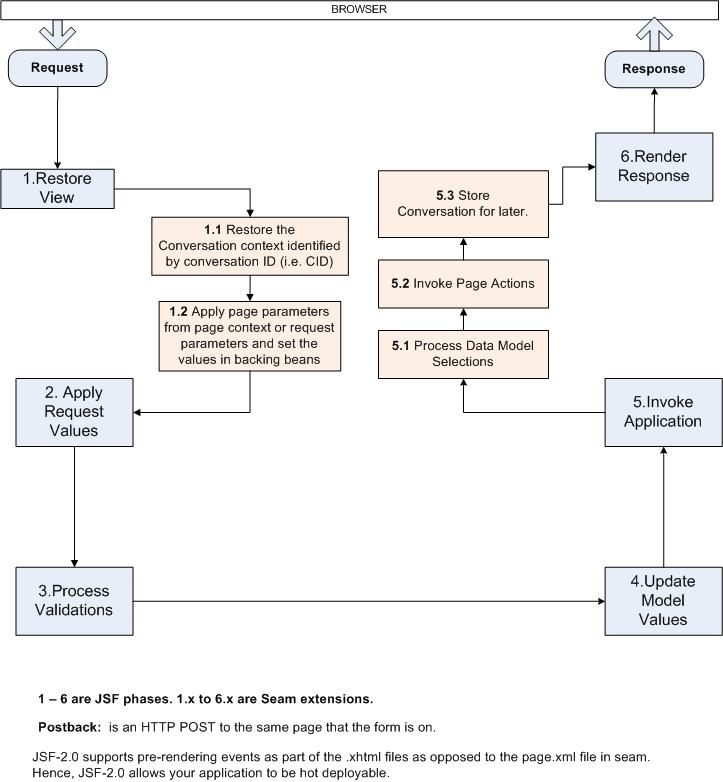
A. JSF's major shortcoming is its heavy reliance on the HTTP session, especially when propagating data across a sequence of pages. Seam rectifies this with a conversational scope. Seam provides some hooks into the JSF life cycle to achieve this along with other benefits.


More JSF Interview Questions and Answers

Labels:

Oct 7, 2011

JSF Interview Questions and Answers: Overview

Q. If you are using JSF, what other frameworks would you require and why? A. JavaServer Faces (JSF) brings a new paradigm to developing Web-based applications in Java. However, it has a number of gaps in its out-of-the-box state.  The frameworks such as Facelets and JBoss seam fill in these gaps.

Facelets are an alternative view technology based on pure XML templates (no scriptlets) which was introduced with Version 2 of the JSF standard. They can only be used in a JSF application. JSPs can be used with JSF for view, but unlike JSPs, Facelets is a templating language built from the ground up with the JSF component life cycle in mind.

With Facelets, you produce templates that build a component tree, not a servlet. This allows for greater reuse than JSPs because you can compose components out of a composition of other components. Facelets tap into the "Restore View" and  "Render Response" phases of the JSF life cycle as shown below.


Seam integrates technologies such as Asynchronous JavaScript and XML (AJAX), JavaServer Faces (JSF), Java Persistence (JPA), Enterprise Java Beans (EJB 3.0) and Business Process Management (BPM) into a unified full-stack solution. Seam extends JSF with handful of annotations, extra functionality for multi-window operation and workspace management,  conversational scopes to minimize HTTP session abuse, model-based validation, jBPM-based pageflow, internationalization, page fragment caching.and bookmarkable RESTful style web pages.

There are other useful optional frameworks like Tucky URL rewrite filter for RESTful URLs, JSFUnit for testing, JQuery for JavaScript, and JSF component libraries like RichFaces, ICEfaces, Trinidad, PrimeFaces, and Tomahawk for rich JSF components. But use these rich component libraries wisely as they could cause your generated HTML pages to be bloated. Bloated pages can take longer to render.

Q. In your experience, what are some of the JSF pitfalls to watch out for?
A.

1. Putting business logic or data access logic in the getter methods. Getters are solely there to access bean properties, not to do some business logic or retrieve data from a database. A getter will normally be called twice or three times per JSF request-response cycle, but it can get called more times, especially when used in UIData components. So, don't use a getter for other purposes than just returning the data.

Conditionally rendering, enabling/disabling, or making it editable or not, etc can get called many times in a data-table. For example, if the rendered attribute occurs in a single row of a data-table, then number of invocations of the backing method will be invoked by the number of rows in the table. In a table with 50 rows, it will be invoked 50 times. If it is used in 4 of the columns in each row, it will be invoked 50 * 4 = 200 times. So, it is imperative that the logic is efficient or else it will have a huge impact on performance.

2. Using too many rich components from third-party libraries like Richfaces, ICEFaces, etc could adversely impact performance due to bloated HTML pages. JSF saves two things between requests:
  • the view (all the HTML controls on the page like text fields, buttons, etc)
  • the view state (the state of the controls)
So, having too many rich controls on a page could lead to HTML bloating, and adversely impact performance. This could be minimized by carefully designing the pages and using AJAX calls to render only a fragment of the HTML DOM (Document Object Model) tree. Also, care must be taken not to have multiple h:form elements on a page as this may result in a copy of the entire view state being included with every form.

3. Having too many backing beans in session scope could lead to memory and performance issues. If you want to have book-markable URLs, you will need to perform redirects, and redirects will blow away the request parameters as new requests will be made. So, you must use the session scope. To prevent any potential issues due to large sessions, either provide your own implementation to periodically clear the session data or use frameworks like seam to take advantage of the conversational scope. If you use the "conversational" scope in Seam, the framework will manage the session data for you with the temporary conversation scope or you could manage it declaratively with the long-running conversational scope.

Put the components in a SEAM conversation scope, which is a slice of the HTTP session managed by the SEAM, and associated with a sequence of pages through the special token  CID (i.e. Conversation ID). This conversation scope provides the developer the convenience of using the HTTP session without the memory leakage concerns, since the conversation has a much shorter lifetime and is kept isolated from other parallel conversations in the same session. The conversation scope also has other benefits of
  • ensuring that the records remain managed by the persistence context while being modified.
  • reducing the number of calls to the database by making previously viewed result pages to load faster since the records are already in Hibernate persistent context (i.e.  first-level cache).
  • maintaining the pagination details like search criteria, current page number, page offset, etc.
4. Not coding in a thread-safe manner. Calls to FacesContext.getCurrentInstance( ) return a thread local data structure, hence thread-safe. Request and unscoped managed beans are of course safe as well. But, Session and application scoped managed beans are obviously accessed by more than one thread. The PhaseListeners and Renderers are not thread safe. Each PhaseListener is global to the application and it subscribes to at least one phase event for every request. Components of the same type share the same Renderer instance for the entire application. When it comes to the converters and validators, the thread-safety depends on how they are used.

Following is thread-safe because a new instance will be created for every input element in view.

<h:inputText ...>
    <f:converter converterId="converterId" />
</h:inputWhatever>

Following is not threadsafe because the same instance will be shared across all views of the entire application

<h:inputText  converter="#{applicationBean.converter}" ....   />

5. Not carefully designing the GUI and the relevant interactions. The JSF data centric applications involve presenting the data in a tabular format, filtering the data, paginating the data, selecting the data via check boxes, and modifying the data. It is imperative to properly think through the various interactions and properly performance test them. For example,
  • Building a composite AJAX enabled component that allows partial page rendering can improve performance. This is provided by the Ajax4jsf component. Ajax4jsf provides a set of tag libraries that ties JSF generated event to the rendering of one or more regions of the user-interface identified by their JSF client IDs. When the AJAX event is sent to the server, instead of the JSF servlet returning an entire page response, it returns only fragments of the HTML to render a particular region.  
  • Thinking carefully about splashing rendered, editable, and disable method calls within each column and row in a data table versus having them on page level. For, example editable table versus non-editable, etc. 
  •  Not utilizing the appropriate strategy to save the viewstate. Performance measurements have shown that plain server side state saving without serialization and compressing state comes with the best values. State saving at client side is also susceptible to security concerns as well as overhead of serialization of entire JSF tree every time. Having said that, the server side strategy will consume more memory. The numberOfViewsInSession parameter can be used to limit number of calls with back buttons inside a faces form to reduce memory consumption.

    <context-param>
        <param-name>com.sun.faces.numberOfViewsInSession</param-name>
        <param-value>3</param-value>
    </context-param>
    
    <context-param>
        <param-name>com.sun.faces.numberOfLogicalViews</param-name>
        <param-value>10</param-value>
    </context-param>


Q. How would you go about debugging a JSF application?
A.

1. You can use a PhaseListener to trace the 6 phases of the JSF lifecycle shown in the diagram above. You can use a "dummy" PhaseListener to debug the phases to see what is happening in each phase. Here is a basic example of such a LifeCycleListener you can use to trace the phases of the JSF lifecycle. For example, to better understand how the attribute immediate=true works.

package com.mypackage;

import javax.faces.event.PhaseEvent;
import javax.faces.event.PhaseId;
import javax.faces.event.PhaseListener;
import java.util.logging.Logger;

public class LifeCycleListener implements PhaseListener {

    protected final Logger logger = Logger.getInstance(this.getClass());

    public PhaseId getPhaseId() {
        return PhaseId.ANY_PHASE;
    }

    public void beforePhase(PhaseEvent event) {
        logger.info("START PHASE " + event.getPhaseId());
    }

    public void afterPhase(PhaseEvent event) {
        logger.info("END PHASE " + event.getPhaseId());
    }

}

Run your log4j in debug mode.

2. Using the FacesTrace library. FacesTrace is an open-source library aiming to enhance the tracebility of applications based on JavaServer Faces. Performance metrics and general trace information of a JSF application is collected and presented in a user-friendly format. The simplest way to use the “runtime debugging” JSF tool FacesTrace is to place the <ft:trace> tag at the end of a page. You will have to declare the tag first.

<%@ taglib uri="http://facestrace.sourceforge.net" prefix="ft" %>

3. Configure your web.xml to run in development or debug modes. For example, if you are using Facelets with JSF, set the development mode to true.

<context-param>
<param-name>facelets.DEVELOPMENT</param-name>
<param-value>true</param-value>
</context-param>

and add the following to the beginning of your facelet template file.

<ui:debug hotkey="k" />

If you Ctrl+Shift+k is pressed, debug window will be opened and displays the component tree and scoped variables.

If you are using Seam, set the debug mode to true.

<context-param>
<param-name>org.jboss.seam.core.init.debug</param-name>
<param-value>true</param-value>
</context-param>

4. Use browsers' debugging capabilities like FireBug plugin for FireFox or Google chrome's out of the box inspect element capability to view the generated HTML source code to get some hints. FireBug for FireFox and Fiddler2 for Internet Explorer can debug AJAX calls.

Q. What is the purpose of the attribute immediate=true
A. The immediate attribute is used in UIInput and UICommand components for the following purposes :

1. Immediate attribute, when set to true, allows a UICommand component like commandLink or commandButton to process the back-end logic and ignore validation process related to the fields on the page. This allows navigation to occur even when there are validation errors.

In the code below, navigation is performed for button click without validating the required field

<h:inputText id="input1" required="true"/>
<h:message for="input1"/>
<h:commandButton value="submit" immediate="true"action="send"/>

2. To make one or more UIInput components "high priority" for validation, so validation is performed, if there is any invalid component data, only for high priority input components and not for low priority input components in the page. This helps reducing the number of error messages shown on the page.

In the code below, validation is performed only for the first component when button is clicked because the immediate=true.

<h:inputText id="input1" immediate="true" required="true"/>
<h:inputText id="input2" required="true"/>
<h:message for="input1"/>
<h:message for="input2"/>
<h:commandButton value="submit" action="send"/>

There are a number of good tutorials and info online like The BalusC Code.

More JSF Interview Questions and Answers

Labels: