Google

Nov 18, 2014

Java exception handling beginner mistakes and best practices

a) Sweeping exceptions under the carpet by doing nothing.

try{
     //...
}catch(SQLException sqe){
    // do nothing
}

In few rare scenarios, it is desired to do nothing with an exception, e.g. in a finally block, you try to close database connection, and some exception occurs. In this case, exception can be ignored.

try{
 
}catch(SQLException sqe){
    //...
}finally{
    try{
        conn.close();
    }catch(Exception e){
        //leave it.
    }
}

But in general, this is a very bad practice and can hide issues. Another typical example is  the InterruptedException. Most Java developers leave the catch block empty. This is a very bad practice. You should either re throw e or restore the interrupted status as shown below

  public void run() { 
    try {
        while (true) {
           //....
    Thread.sleep(1000);
        }
    }
    catch (InterruptedException e) { 
       // Restore the interrupted status
       Thread.currentThread().interrupt();
    }
  }


If a thread is executing a low-level interruptible blocking method like Thread.sleep( ), Thread.join( ), or Object.wait( ), it unblocks and throws InterruptedException. The interrupted status can be read with Thread.isInterrupted( ).

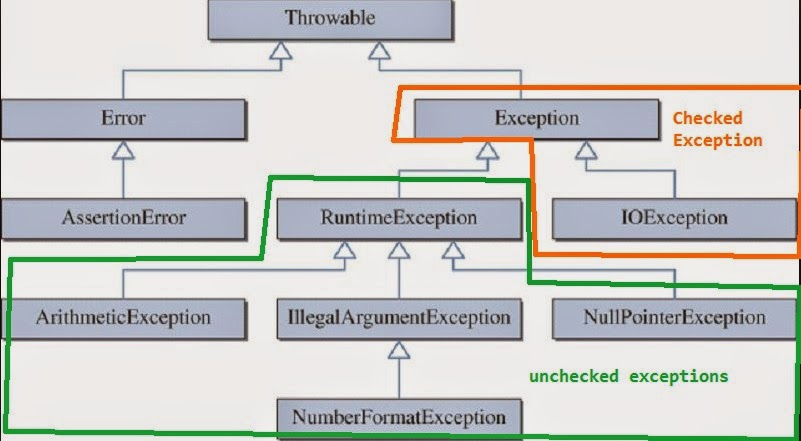
b) Inconsistent use of checked and unchecked (i.e. Run time) exceptions.

Document a consistent exception handling strategy. In general favor unchecked (i.e. Run time) exceptions, which you don't have to handle with catch and throw clauses. Use checked exceptions in rare scenarios where you can recover from the exception like deadlock or service retries. In this scenario, you will catch a checked exception like java.io.IOException and wait a few seconds as configured with the retry interval, and retry the service configured by the retry counts. After a few retries, the exception is thrown to the caller.


c) Exceptions are polymorphic in nature and more specific exceptions need to be caught before the generic exceptions.

So, it is wrong to catch Exception before IOException.

try{
   //....
} catch(Exception ex){
    log.error("Error:" + ex)
} catch(IOException ex){
    log.error("Connectivity issue:" + ex); //never reached as Exception catch block                                           //catches everything
}


Fix this by catching the more specific IOException first

try{
   //....
} catch(IOException ex){
    log.error("Connectivity issue:" + ex);
} catch(Exception ex){
    log.error("Error:" + ex)
} 


In Java 7 onwards, you can catch multiple exceptions like

try{
   //....
} 
catch (ParseException | IOException exception) {
    // handle I/O problems.
} catch (Exception ex) {
    //handle all other exceptions
}


d) Wiping out the stack trace

try{
    //....
}catch(IOException ioe){
    throw new MyException("Problem in data reading."); //ioe stack is lost
}


e) Unnecessary Exception Transformation.

In a layered application, many times each layer catches exception and throws new type of exception. Sometimes it is absolutely unnecessary to transform an exception. An unchecked excption can be automatically bubbled all the way upto the GUI Layer, and then handled at the GUI layer with a log.error(ex) for the log file and a generic info like "An expected error has ocurred, and please contact support on xxxxx" to the user. Internal details like stack trace with hostnames, database table names, etc should not be shown to the user as it can be exploited to cause security threats.

Data Access Layer --> Business Service Layer --> GUI Layer


f)  why throw exceptions early, and catch exceptions late?

Best practice is to throw exceptions at the point when the errors occur so that you have the most detail about the cause of the exception. For example, you want to know the line that throws the NullPointerException so that you can figure out which variable is null. NullPointerException means you have some broken code, and you need to fix your code. A good example for throwing early would be to throw IllegalArgumentException.

  public void someMethod(String input){
      if(StringUtils.isEmpty(input)){
      throw new IllegalArgumentException("input cannot be empty");
      }
   
      //.....do something
  }

Catching an exception too early before it can properly be handled, often leads to further errors and exceptions.

Bad: Catching it too early

public void readFile(String filename) 
{
    //...
    
    InputStream in = null;
    
    // Don't do this !!! 
    try
    {
        in = new FileInputStream(filename);
    }
    catch (FileNotFoundException e)
    {
        logger.log(e);
    }
    
     in.read(...);
    
    //...
}

Good: Catching exceptions late

public void readFile(String filename) throws IOException
{
    if (filename == null)
    {
        throw new IllegalArgumentException ("filename is null");
    }  
    
    //...
    
    InputStream in = new FileInputStream(filename);
    
    //...
}


In many situations, the higher layer like the GUI layer knows how to handle the exceptions than the lower layers like data access objects. In many cases, same data access exception will be handled differently by the different calling code. If an exception is thrown, you catch it and decide on the following 4 possible actions to take.
  1. Catch --> Rethrow (but include the original exception with some additional information). 
  2. Catch --> Handle (mainly in the higher layer (e.g. GUI layer) where you make the final decision like logging the exception and asking the user to contact support).
  3. Let the exception bubble up to the higher layers
  4. Catch --&gt Return an error code (for example in batch jobs, Unix scripts, etc). Usually in a higher layer.


Labels: ,

Jul 27, 2014

Top 10 most common Core Java beginner mistakes

Mistake #1: Using floating point data types like float or double for monetary calculations. This can lead to rounding issues.

package com.monetary;
import java.math.BigDecimal;

public class MonetaryCalc {
 
    public static void main(String[] args) {
      System.out.println(1.05 - 0.42); //1:  $0.6300000000000001
       //2: $0.63
      System.out.println(new BigDecimal("1.05") .subtract(new BigDecimal("0.42")));
      //3: $0.630000000000000059952043329758453182876110076904296875
      System.out.println(new BigDecimal(1.05) .subtract(new BigDecimal(0.42)));
      //4: $0.63
      System.out.println(BigDecimal.valueOf(1.05) .subtract(BigDecimal.valueOf(0.42)));
      System.out.println(105 - 42); //5: 63 cents
   }
}

In the above code, 2, 4, and 5 are correct and 1 and 3 are incorrect usage leading to rounding issues. So, either use BigDecimal properly as shown in 2 and 4, or use the smallest monetary value like cents with data type long. The cents approach performs better, and handy in applications that have heavy monetary calculations.

Mistake #2: Using floating point variables like float or double in loops to compare for equality. This can lead to infinite loops.

 public static void main(String[] args) {
         float sum = 0;
         while (sum != 1.0) { //causes infinite loop.
             sum += 0.1;
         }
         System.out.print("The sum is: "+sum);
 }


Fix is to change while (sum != 1.0) to while (sum < 1.0). Even then, due to mistake #1, you will get rounding issues (e.g. The sum is: 1.0000001). So, the better fix is

   public static void main(String[] args) {
         BigDecimal sum = BigDecimal.ZERO;
         while (sum.compareTo(BigDecimal.ONE)  != 0) { 
             sum =  sum.add(BigDecimal.valueOf(0.1)); 
         }
         System.out.print("The sum is: "+sum); //The sum is: 1.0
 }


Mistake #3: Not properly implementing the equals(..) and hashCode( ) methods. Can you pick if anything wrong with the following Person class.

public class Person  {

 private String name;
 private Integer age;

 public Person(String name, Integer age) {
  this.name = name;
  this.age = age;
 }

 //getters and setters

 @Override
 public String toString() {
  return "Person [name=" + name + ", age=" + age + "]";
 } 
}

Now, the main class that creates a collection of Person, and then searches for a person.

import java.util.Collections;
import java.util.Set;
import java.util.TreeSet;
import java.util.concurrent.CopyOnWriteArraySet;

public class PersonTest {
 
 public static void main(String[] args) {
  
  Set<Person> people = new CopyOnWriteArraySet<>();
  people.add(new Person("John", 35));
  people.add(new Person("John", 32));
  people.add(new Person("Simon", 30));
  people.add(new Person("Shawn", 30));
  
  System.out.println( people);
  
  Person search = new Person("John", 35);
  
  if(people.contains(search)){
   System.out.println("found: " + search);
  }
  else {
   System.out.println("not found: " + search);
  }
 
 }

}

The output

[Person [name=John, age=35], Person [name=John, age=32], Person [name=Simon, age=30], Person [name=Shawn, age=30]]
not found: Person [name=John, age=35]

Q. Why is the person not found even though there in the collection?
A. Every Java object implicitly extends the Object class, which has the default implementation of equals(...) and hashCode( ) methods. The equals(...) method is  implicitly invoked by the Set class's contains(...) method. In this case the default implementation in the Object class performs a shallow comparison of the references, and not the actual values like name and age. The equals and hashCode methods in Java are meant for overridden for POJOs. So, this can be fixed as shown below by overriding the equals and hashCode methods in Person.

import org.apache.commons.lang.builder.EqualsBuilder;
import org.apache.commons.lang.builder.HashCodeBuilder;

public class Person  {

 private String name;
 private Integer age;

 public Person(String name, Integer age) {
  this.name = name;
  this.age = age;
 }

 //getters and setters

 @Override
 public int hashCode() {
  return new HashCodeBuilder().append(name).append(age).hashCode();
 }

 @Override
 public boolean equals(Object obj) {
  Person rhs = (Person) obj;
  return new EqualsBuilder().append(this.name, rhs.name).append(this.age, rhs.age).isEquals();
 }

 @Override
 public String toString() {
  return "Person [name=" + name + ", age=" + age + "]";
 }
 
}

Now, output will be

[Person [name=John, age=35], Person [name=John, age=32], Person [name=Simon, age=30], Person [name=Shawn, age=30]]
found: Person [name=John, age=35]

There are other subtle issues you can face if the hashCode and equals contracts are not properly adhered to. Refer to the Object class API for the contract details.

When sorting objects in a collection with compareTo, it is strongly recommended, but not strictly required that (x.compareTo(y)==0) == (x.equals(y)). Generally speaking, any class that implements the Comparable interface and violates this condition should clearly indicate this fact.

Mistake #4: Getting a ConcurrentModificationException  when trying to modify (i.e. adding or removing an item) a collection while iterating.

The following code throws a ConcurrentModificationException.

List<T> list = getListOfItems();
for (Iterator<T> iter = list.iterator(); iter.hasNext(); ) {
  T obj = iter.next();
  if (obj.someCondition()) {
    list.remove(0); // ConcurrentModificationException
  }
}

To avoid ConcurrentModificationException in a single-threaded environment, you can remove the object that you are working on with the iterator.

List<T> list = getListOfItems();
for (Iterator<T> iter = list.iterator(); iter.hasNext(); ) {
  T obj = iter.next();
  if (obj.someCondition()) {
    iter.remove(); //OK to use the iterator
  }
}

To Avoid ConcurrentModificationException in a multi-threaded environment:

If you are using JDK1.5 or higher then you can use ConcurrentHashMap and CopyOnWriteArrayList classes. This is the recommended approach compared to other approaches like locking the list with synchronized(list) while iterating, but this approach defeats the purpose of using multi-threading.

Q. Difference between fail-fast and fail-safe iterators
A. Iterators returned by most of pre JDK1.5 collection classes like Vector, ArrayList, HashSet, etc are fail-fast iterators. Iterators returned by JDK 1.5+ ConcurrentHashMap and CopyOnWriteArrayList classes are fail-safe iterators.


Mistake #5: Common exception handling mistakes.

a) Sweeping exceptions under the carpet by doing nothing.

try{
 
}catch(SQLException sqe){
    // do nothing
}


In few rare scenarios, it is desired to do nothing with an exception, e.g. in finally block, we try to close database connection, and some exception occurs. In this case, exception can be ignored.

try{
 
}catch(SQLException sqe){
    ...
    ...
}finally{
    try{
        conn.close();
    }catch(Exception e){
        //leave it.
    }
}


But in general, this is a very bad practice and can hide issues.

b) Inconsistent use of checked and unchecked (i.e. Runtime) exceptions.

Document a consistent exception handling strategy. In general favor unchecked (i.e. Runtime) exceptions, which you don't have to handle with catch and throw clauses. Use checked exceptions in a rare scenarios where you can recover from the exception like deadlock or service retries. In this scenario, you will catch a checked exception like java.io.IOException and wait a few seconds as configured with the retry interval, and retry the service configured by the retry counts.


c) Exceptions are polymorphic in nature and more specific exceptions need to be caught before the generic exceptions. 

So, it is wrong to catch Exception before IOException.

try{
   //....
} catch(Exception ex){
    log.error("Error:" + ex)
} catch(IOException ex){
    log.error("Connectivity issue:" + ex); //never reached as Exception catch block catches everything
}


Fix this by catching the more specific IOException first

try{
   //....
} catch(IOException ex){
    log.error("Connectivity issue:" + ex);
} catch(Exception ex){
    log.error("Error:" + ex)
} 

In Java 7 on wards, you can catch multiple exceptions like

try{
   //....
} 
catch (ParseException | IOException exception) {
    // handle I/O problems.
} catch (Exception ex) {
    //handle all other exceptions
}

d) Wiping out the stack trace

try{
    //....
}catch(IOException ioe){
    throw new MyException("Problem in data reading."); //ioe stack is lost
}

e) Unnecessary Exception Transformation. 

In a layered application, many times each layer catches exception and throws new type of exception. Sometimes it is absolutely unnecessary to transform an exception. An unchecked exception can be automatically bubbled all the way upto the GUI Layer, and then handled at the GUI layer with a log.error(ex) for the log file and a generic info like "An expected error has occurred, and please contact support on xxxxx" to the user. Internal details like stack trace with host names, database table names, etc should not be shown to the user as it can be exploited to cause security threats.

Data Access Layer --> Business Service Layer --> GUI Layer

Mistake #6: Using System.out.println(... ) statements for debugging without making use of the debugging capabilities provided in IDE tools. If you need to log, use log4j library instead.

if(log.isDebugEnabled()) {
    log.debug("..................");
}
//....
log.info("................");
//...
log.error(ex);


The log4j library will not only perform better than System.out.println statements, but also provides lots of additional features like writing to a file, console, queue, etc, archiving and rolling the log files, controlling the log levels with debug, warn, info, error, etc and many more.

Mistake #7: Reinventing the wheel by writing your own logic when there are already well written and proven APIs and libraries are available. When coding, always have Core Java APIs, Apache APIs, Spring framework APIs, Google Gauva library APIs, and relevant reference documentations handy to reuse them instead of writing your own half baked solutions.

Instead of:

if(str != null && str.trim().length() > 0) {
   //..............
}

You can use the StringUtils library from the Apache commons API to simplify your code

if(!StringUtils.isEmpty(str){
    //...........
}

EqualsBuilder, HashCodeBuilder, StringBuilder, etc are Apache commons utility methods.


Mistake #8: Resource leak issues are reported when resources are allocated but not properly disposed (i.e. closed) after use.

The system resources like file handles, sockets, database connections, etc are limited resources that need to be closed once done with them otherwise your applications run the risk of leaking resources and then running out of sockets, file handles, or database connections.

Bad code: if an exception is thrown before in.close() is reached, the Scanner that is holding on to the System.in resource will never get closed.

public void readShapeData() throws IOException {
    Scanner in = new Scanner(System.in);
    log.info("Enter salary: ");
    salary = in.nextDouble();
    in.close();
}

Good code: The finally block is reached even if an exception is thrown. So, the scanner will be closed.

public void readShapeData() throws IOException {
    Scanner in = new Scanner(System.in);
    try {
        log.info("Enter salary: ");
        salary = in.nextDouble();
    } finally {
        in.close();  //reached even when an exception is thrown
    }
}


Mistake #9: Comparing two objects ( == instead of .equals)

When you use the == operator, you are actually comparing two object references, to see if they point to the same object. You cannot compare, for example, two strings or objects for equality, using the == operator. You must instead use the .equals method, which is a method inherited by all classes from java.lang.Object.


Mistake #10: Confusion over passing by value, and passing by reference as Java has both primitives like int, float, etc and objects.

When you pass a primitive data type, such as a char, int, float, or double, to a function then you are passing by value, which means a copy of the data type is duplicated, and passed to the function.If the function chooses to modify that value, it will be modifying the copy only.

When you pass a Java object, such as an array or an Employee object, to a function then you are passing by reference, which means the reference is copied, but both the original and copied references point to the same object. Any changes you make to the object's member variables will be permanent - which can be either good or bad, depending on whether this was what you intended.


5 bonus mistakes:

  1. Forgetting that Java is zero-indexed.
  2. Not writing thread-safe code with proper synchronization or thread-local objects. 
  3. Not favoring immutable objects. Immutable objects are inherently thread-safe.
  4. Not properly handling null references, and causing the ubiquitous NullPointerException. This is a run time exception and the compiler can't warn you. 
  5. Capitalization errors where the class names and Java file names should start with capital letters and method and variable names should start with lowercase letters.


Labels:

Jul 16, 2014

Top 50 Core Java Interview questions you can't afford to get wrong - Maps and Objects

Core Java Interview Questions and Answers

1-10 Language Fundamentals every Java developer must know 11-23 OOP every Java developer must know 24-36 interfaces and generics every Java developer must know 37-42 garbage collection and pass-by-reference every Java developer must know 43-54 maps and objects every Java developer must know

Q43. What can you tell about the performance of a HashMap compared to a TreeMap? Which one would you prefer?
A43. A balanced tree does have O (log n) performance. The TreeMap class in Java maintains key/value objects in a sorted order by using a red-black tree. A red-black tree is a balanced binary tree. Keeping the binary tree balanced ensures the fast insertion, removal, and lookup time of O (log n). This is not as fast as a HashMap, which is O(1) , but the TreeMap has the advantage of that the keys are in sorted order which opens up a lot of other capabilities.

Which one to choose?

The decision as to using an unordered collection like a HashSet or HasMap versus using a sorted data structure like a TreeSet or TreeMap depends mainly on the usage pattern, and to some extent on the data size and the environment you run it on. The practical reason for keeping the elements in sorted order is for frequent and faster retrieval of sorted data if the inserts and updates are frequent. If the need for a sorted result is infrequent like prior to producing a report or running a batch process, then maintaining an unordered collection and sorting them only when it is really required with Collections.sort(...) could sometimes be more efficient than maintaining the ordered elements. This is only an opinion, and no one can offer you a correct answer. Even the complexity theories like Big-O notation O(n) assume possibly large values of n. In practice, a O(n) algorithm can be much faster than a O(log n) algorithm, provided the data set that is handled is sufficiently small. So, always conduct a performance testing with the real life data to tune your code.

Q44. When providing a user defined key class for storing objects in the HashMaps, what methods do you have to provide or override (i.e. method overriding)?
A44. You should override the equals( ) and hashCode( ) methods from the Object class. The default implementation of the equals( ) and hashcode( ), which are inherited from the java.lang.Object uses an object instance’s memory location (e.g. Car@6c60f2ea). This can cause problems when two instances of the car objects have the same color but the inherited equals( ) will return false because it uses the memory location, which is different for the two instances. Also, the toString( ) method can be overridden to provide a proper string representation of your object.


Note: Java hashCode( ) and equals( ) method have to be properly implemented. The map and set interfaces also use the containsKey(Object key) and contains (Object o) methods use the equals( ) method to determine the return value – true/false. In the class defined by yourself, if you don’t explicitly override these methods, it will have a default implementation. It returns true if and only if two objects refer to the same object, i.e., x == y is true.

Q45. Is the following statement true?

If you modify or add equals method then you must modify or add hashCode method as well.

A45. Yes. The contract between equals(...) and hashCode( ) can be summarized as shown below.
  • If a class overrides equals(...), it must override hashCode( )
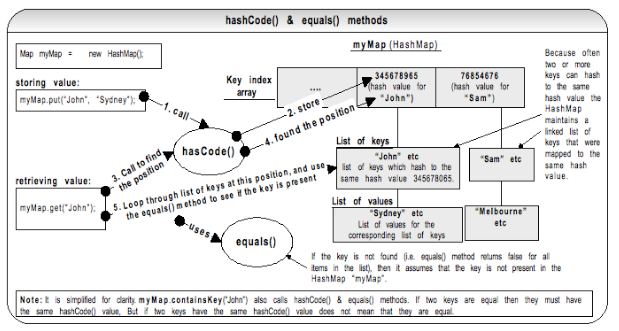
  • If 2 objects are equal, then their hashCode values must be same as well. The reverse is not true. If 2 objects have the same hashCode does not mean that those objects are equal as well. As per the above diagram, more than one object can result in the same hash code value say 345678965 and occupy the same bucket. These objects may or may not be equal. But if 2 objects are equal, they must occupy the same bucket with the same hash code value. 
  • If a field is not used in equals(...), then it must not be used in hashCode( ).

Q46. When defining a user defined key class, what other consideration apart from overriding the equals(..) and hashCode( ) method you should think of?
A46. Implement the user defined key class as an immutable object. As per the code snippet shown below if you use a mutable user defined class “UserKey” as a HashMap key and subsequently if you mutate (i.e. modify via setter method e.g. key.setName(“Sam”)) the key after the object has been added to the HashMap then you will not be able to access the object later on. The original key object will still be in the HashMap (i.e. you can iterate through your HashMap and print it – both prints as “Sam” as opposed to “John” & Sam), but you cannot access it with map.get(key) or querying it with map.containsKey(key) will return false because the key “John” becomes “Sam” in the “List of keys” at the key index “345678965” if you mutate the key after adding. These types of errors can be very hard to trace and fix.

Map myMap = new HashMap(10);

//add the key “John” 
UserKey key = new UserKey(“John”);  //Assume UserKey class is mutable
myMap.put(key, “Sydney”);

// same key object is mutated instead of creating a new instance.
// This line modifies the key value “John” to “Sam” in the “List of keys”
// as shown in the diagram above. This means that the key “John” cannot be
// accessed. There will be two keys with “Sam” in positions with hash 
// values 345678965 and 76854676.  

key.setName(“Sam”); 
 
myMap.put(key, “Melbourne”);

// The key cannot be accessed. The key hashes to the same position 
// 345678965 in the “Key index array” but cannot be found in the “List of keys”.

myMap.get(new UserKey(“John”));

Q47. What is an immutable object? Why is it a best practice to use immutable objects in Java?
A47. Immutable objects are objects whose state (i.e. the object's data) cannot change after construction. Examples of immutable objects from JDK include String and wrapper classes like Integer, Double, Character, etc.
  • Immutable classes can greatly simplify programming by freely allowing you to cache and share the references to the immutable objects without having to defensively copy them or without having to worry about their values becoming stale or corrupted. 
  • Immutable classes are inherently thread-safe and you do not have to synchronize access to them to be used in a multi-threaded environment. So there are no chances for negative performance consequences as multiple threads can share the same instance. 
  • Eliminates the possibility of data becoming inaccessible when used as keys in HashMaps or as elements in Sets. These types of errors are hard to debug and fix. 
  • Eliminates the need for class invariant check once constructed. 
  • Allow hashCode( ) method to use lazy initialization, by caching its return value. 
  • Cloning is not required.
  • Simpler to construct, use, and test due to its deterministic state.

Q48. How do you create an immutable type?
A48. 1) Make the class final so that it cannot be extended or use static factories and keep constructors private.

public final class MyImmutable { … }

2) Make fields private and final.

private final int[ ] myArray;  

3) Don't provide any methods that can change the state of the immutable object in any way, not just setXXX methods, but any methods which can change the state.

4) The “this” reference is not allowed to escape during construction from the immutable class. Defensively copy references during construction.

public Person(Date birthDate) {
 super( );
 //defensively copy
 this.birthDate = new Date(birthDate.getDate());
}

5) Don't return or expose the mutable references to the caller. This can be done by defensively copying the objects by deeply cloning them.

For example, when constructing a date object

//Don't let the date escape by returning a defensively copied date
public Date getBirthDate( ) {
      //defensively copy so that original date does not escape and modified
      return new Date(this.bithDate.getTime( )); 
}

Another example would be when using a collection

public Collection<role> getRoles()
{
 //returns immutable collection, so new roles cannot be added from outside
 return Collections.unmodifiableCollection(roles); 
}

Q49. What is serialization? What rules do you need to follow?
A49. Object serialization is a process of reading or writing an object. It is a process of saving an object’s state to a sequence of bytes, as well as a process of rebuilding those bytes back into a live object at some future time. An object is marked serializable by implementing the java.io.Serializable interface. This simply allows the serialization mechanism to verify that a class can be persisted, typically to a file. The common process of serialization is also called marshaling or deflating when an object is flattened into byte streams. The flattened byte streams can be unmarshaled or inflated back to an object.


Rule #1: The object to be persisted must implement the Serializable interface or inherit that interface from its object hierarchy. Alternatively, you can use an Externalizable interface to have full control over your serialization process. For example, to construct an object from a pdf file.

Rule #2: The object to be persisted must mark all non-serializable fields as transient. For example, file handles, sockets, threads, etc.

Rule #3: You should make sure that all the included objects are also serializable. If any of the objects is not serializable, then it throws a NotSerializableException.

Rule #4: Base or parent class fields are only handled if the base class itself is serializable.

Rule #5: Serialization ignores static fields, because they are not part of any particular state.

Q51. How do you exclude a field of a class from serialization?
A51. By marking it as transient. The fields marked as transient in a serializable object will not be transmitted in the byte stream. An example would be a file handle, a database connection, a system thread, etc. Such objects are only meaningful locally. So they should be marked as transient in a serializable class.

Q52. What happens to static fields during serialization?
A52. Static fields are not serialized. Serialization persists only the state of a single object. Static fields are not part of the state of an object as they are effectively the state of the class shared by many other instances.

Q53. What are the benefits of serialization?
A53. 1) Allows you to persist objects with state to a text file on a disk, and re-assemble them by reading the file back. Application servers can do this to conserve memory. For example, stateful EJBs can be activated and passivated using serialization. The objects stored in an HTTP session should be serializable to support in-memory replication of sessions to achieve scalability.

2) Allows you to send objects from one Java process to another using sockets, RMI, RPC, etc. In other words passing objects between processes. Allows you to deeply clone any arbitrary object graph.

3) Allows you to deeply clone any arbitrary object graph.

Q54. What is a serial version id?
A54. Say you create a “Pet” class, and instantiate it to "myPet", and write it out to an object stream. This flattened "myPet" object sits in the file system for some time. Meanwhile, if the “Pet” class is modified by adding a new field, and later on, when you try to read (i.e. deserialize or inflate) the flattened “Pet” object, you get the java.io.InvalidClassException – because all serializable classes are automatically given a unique identifier. This exception is thrown when the identifier of the class is not equal to the identifier of the flattened object. If you really think about it, the exception is thrown because of the addition of the new field. You can avoid this exception being thrown by controlling the versioning yourself by declaring an explicit serialVersionUID. There is also a small performance benefit in explicitly declaring your serialVersionUID because it does not have to be calculated.

So, it is a best practice to add your own serialVersionUID to your Serializable classes as soon as you define them. If no serialVersionUID is declared, JVM will use its own algorithm to generate a default SerialVersionUID. The default serialVersionUID computation is highly sensitive to class details and may vary from different JVM implementation, and result in an unexpected InvalidClassExceptions during deserialization process.

Core Java Interview Questions and Answers

1-10 Language Fundamentals every Java developer must know 11-23 OOP every Java developer must know 24-36 interfaces and generics every Java developer must know 37-42 garbage collection and pass-by-reference every Java developer must know 43-54 maps and objects every Java developer must know

Labels:

Jul 15, 2014

Top 50 Core Java Interview questions you can't afford to get wrong - garbage collection and pass-by-reference

Core Java Interview Questions and Answers

1-10 Language Fundamentals every Java developer must know 11-23 OOP every Java developer must know 24-36 interfaces and generics every Java developer must know 37-42 garbage collection and pass-by-reference every Java developer must know 43-54 maps and objects every Java developer must know

Q37. What do you know about the Java garbage collector? When does the garbage collection occur?
A37. Each time an object is created in Java, it goes into the area of memory known as heap. The Java heap is called the garbage collectable heap. The garbage collection cannot be forced. The garbage collector runs in low memory situations. When it runs, it releases the memory allocated by an unreachable object. The garbage collector runs on a low priority daemon (i.e. background) thread. You can nicely ask the garbage collector to collect garbage by calling System.gc( ) but you can’t force it.

Q38. What is an unreachable object?
A38. An object’s life has no meaning unless something has reference to it. If you can’t reach it then you can’t ask it to do anything. Then the object becomes unreachable and the garbage collector will figure it out. Java automatically collects all the unreachable objects periodically and releases the memory consumed by those unreachable objects to be used by the future reachable objects.

You can use the following options with the Java command to enable tracing for garbage collection events.

java -verbose:gc


Q39. What is the difference between a weak reference and a soft reference? Which one would you use for caching?
A39. Weak reference: A weak reference, simply put, is a reference that isn't strong enough to force an object to remain in memory. Weak references allow you to leverage the garbage collector's ability to determine reachability for you, so you don't have to do it yourself. You create a weak reference like this:

Car c1 = new Car( );         //referent is c1 is a strong reference
WeakReference<Car> wr = new WeakReference<Car>(c1);

A weak reference is a holder for a reference to an object, called the referent. Weak references and weak collections are powerful tools for heap management, allowing the application to use a more sophisticated notion of reachability, rather than the "all or nothing" reachability offered by ordinary (i.e. strong) references.

A WeakHashMap stores the keys using WeakReference objects, which means that as soon as the key is not referenced from somewhere else in your program, the entry may be removed and is available for garbage collection. One common use of WeakReferences and WeakHashMaps in particular is for adding properties to objects. If the objects you are adding properties to tend to get destroyed and created a lot, you can end up with a lot of old objects in your map taking up a lot of memory. If you use a WeakHashMap instead the objects will leave your map as soon as they are no longer used by the rest of your program, which is the desired behavior.

Soft reference is similar to a weak reference, except that it is less eager to throw away the object to which it refers. An object which is only weakly reachable will be discarded at the next garbage collection cycle, but an object which is softly reachable will generally stick around for a while as long as there is enough memory. Hence the soft references are good candidates for a cache.

byte[ ] cache = new byte[1024];
//... populate the cache. The referent is  cache
SoftReference<byte> sr = new    SoftReference<byte>(cache);

The garbage collector may or may not reclaim a softly reachable object depending on how recently the object was created or accessed, but is required to clear all soft references before throwing an OutOfMemoryError.

Note: The weak references are eagerly garbage collected, and the soft references are lazily garbage collected under low memory situations.

Q40. If you have a circular reference of objects, but you no longer reference it from an execution thread, will this object be a potential candidate for garbage collection?
A40. Yes. Refer diagram below.


Q41. What is the main difference between pass-by-reference and pass-by-value? Which one does Java use?
A41. Other languages use pass-by-reference or pass-by-pointer. But in Java no matter what type of argument you pass the corresponding parameter (primitive variable or object reference) will get a copy of that data, which is exactly how pass-by-value (i.e. copy-by-value) works.


In Java, if a calling method passes a reference of an object as an argument to the called method, then the passed-in reference gets copied first and then passed to the called method. Both the original reference that was passed-in and the copied reference will be pointing to the same object. So no matter which reference you use, you will be always modifying the same original object, which is how the pass-by-reference works as well.


If your method call involves inter-process (e.g. between two JVMs) communication, then the reference of the calling method has a different address space to the called method sitting in a separate process (i.e. separate JVM). Hence inter-process communication involves calling method passing objects as arguments to called method by-value in a serialized form.

Q42. How would you take advantage of Java being a stack based language? What is a reentrant method?
A42. Recursive method calls are possible with stack based languages and re-entrant methods.

A re-entrant method would be one that can safely be entered, even when the same method is being executed, further down the call stack of the same thread. A non-re-entrant method would not be safe to use in that way. For example, writing or logging to a file can potentially corrupt that file, if that method were to be re-entrant.

A function is recursive if it calls itself. Given enough stack space, recursive method calls are perfectly valid in Java though it is tough to debug. Recursive functions are useful in removing iterations from many sorts of algorithms. All recursive functions are re-entrant, but not all re-entrant functions are recursive.

Stack uses LIFO (Last In First Out), so it remembers its ‘caller’ and knows whom to return when the function has to return. Recursion makes use of system stack for storing the return addresses of the function calls.

public class RecursiveCall {

    public int countA(String input) {
       
        // exit condition – recursive calls must have an exit condition
        //otherwise you will get stack overflow error 
        if (input == null || input.length( ) == 0) {
            return 0;
        }

        int count = 0;
         
        //check first character of the input 
        if (input.substring(0, 1).equals("A")) {
            count = 1;
        }
        
        //recursive call to evaluate rest of the input 
        //(i.e.  2nd character onwards)
        return count + countA(input.substring(1)); 
    }

    public static void main(String[ ] args) {
         System.out.println(new RecursiveCall( ).countA("AAA rating"));    // 3
    }
}


Recursion might not be the efficient way to code, but recursive functions are shorter, simpler, and easier to read and understand. Recursive functions are very handy in working with tree structures and avoiding unsightly nested for loops. If a particular recursive function is identified to be a real performance bottleneck as it is invoked very frequently or it is easy enough to implement using iteration like the sample code below, then favor iteration over recursion.

Core Java Interview Questions and Answers

1-10 Language Fundamentals every Java developer must know 11-23 OOP every Java developer must know 24-36 interfaces and generics every Java developer must know 37-42 garbage collection and pass-by-reference every Java developer must know 43-54 maps and objects every Java developer must know

Labels:

Jul 14, 2014

Java bitwise operators with practical examples

Even though there is rarely a time bitwise operations seem directly necessary, the standard Java libraries use bitwise operations indirectly for efficient processing. For example, the StringBuffer.reverse( ), Integer.toString( ), BigDecimal and BigInteger classes to name a few. There are number of practical examples listed where bitwise operations are very handy. Some interviewers prefer asking questions on this topic or including it in the written test to determine how technical you are.


Example 1: To pack and unpack values. For example, to represent
  • age of a person in the range of 0 to 127. Use 7 bits.
  • gender of a person 0 or 1 (0 – female and 1 – male). Use 1 bit.
  • height of a person in the range of 0 to 255. Use 8 bits.

To pack this info: (((age << 1) | gender ) << 8 ) | height. For example, age = 25, gender = 1, and height = 255cm. Shift the age by 1 bit, and combine it with gender, and then shift the age and gender by 8 bits and combine it with the height.

Packing

Age
Gender
Height
Bits
16
15
14
13
12
11
10
9
8
7
6
5
4
3
2
1
age (25 years) using 7 bits
0
0
0
0
0
0
0
0
0
0
0
1
1
0
0
1
Age << 1 (Shift age by 1 bit)
0
0
0
0
0
0
0
0
0
0
1
1
0
0
1
0
Gender (1 – male) using 1 bit
0
0
0
0
0
0
0
0
0
0
0
0
0
0
0
1
Combine age with gender:

(age << 1) | gender
0
0
0
0
0
0
0
0
0
0
1
1
0
0
1
1
((age << 1) | gender ) << 8 ), shift age and gender by 8 bits.
0
0
1
1
0
0
1
1
0
0
0
0
0
0
0
0
Height (255 cm) using 8 bits.
0
0
0
0
0
0
0
0
1
1
1
1
1
1
1
1
Combine height with age and gender:

val = (((age << 1) | gender ) << 8 ) | height
0
0
1
1
0
0
1
1
1
1
1
1
1
1
1
1

Age range

16 + 8 + 1 = 25
Gender
= 1
Height range

128 + 64 + 32 + 16 + 8 + 4 + 2 + 1 = 255.


public class Binary5 {

    public static void main(String[ ] args) {
        
        //packing
        int val = ((((25 << 1) | 1) << 8) | 255);
        System.out.println("packed=" + val);
        System.out.println("packed binary=" 
                               + Integer.toBinaryString(val));       //0011001111111111
        
        //unpacking
        System.out.println("height=" + (val & 0xff));                //extract last 8 bits.
        System.out.println("gender=" + ((val >>> 8) & 1));  //extract bit 9
        System.out.println("age=" + ((val >>> 9)));         //extract bits 10 – 16.

    }
}

Output: 

packed=13311
packed binary=11001111111111
height=255
gender=1
age=25


Unpacking (or extracting) height: Extract the low order 8 bits.
packed value:
0
0
1
1
0
0
1
1
1
1
1
1
1
1
1
1
Masking: 0xFF
0
0
0
0
0
0
0
0
1
1
1
1
1
1
1
1
Extract height =
value & 0xFF:
0
0
0
0
0
0
0
0
1
1
1
1
1
1
1
1


27
26
25
24 23 22 21 20
height:


128 + 64 + 32 + 16 + 8 + 4 + 2 + 1 = 255


Unpacking (or extracting) gender: Extract bit 9.
packed value:
0
0
1
1
0
0
1
1
1
1
1
1
1
1
1
1
8 lower order bits (i.e. shaded area) are shifted out.

value >>> 8
0
0
0
0
0
0
0
0
0
0
1
1
0
0
1
1
Masking: 1
0
0
0
0
0
0
0
0
0
0
0
0
0
0
0
1
Extract gender =
(value >>> 8) &1:
0
0
0
0
0
0
0
0
0
0
0
0
0
0
0
1


20
gender:


1

Unpacking (or extracting) age: Extract bits 10 – 16 (i.e. higher order bits ).

packed value:
0
0
1
1
0
0
1
1
1
1
1
1
1
1
1
1
Extract age =
value >>> 9:
0
0
0
0
0
0
0
0
0
0
0
1
1
0
0
1


26
25 24 23 22 21 20
age:


24 + 23 + 20 = 16 + 8 + 1 = 25


Example 2: To compactly represent a number of attributes like being bold, italics, etc of a character in a text editor. This is a more practical example.


shadow
blink
subscript
superscript
strikethrough
underline
italics
bold
0
1
0
1
0
0
0
1


import java.util.Arrays;

public class Binary6 {
    public static void main(String[ ] args) {
        byte[ ] vals = { 0, 1, 0, 1, 0, 0, 0, 1 };

        byte value = pack(vals);
        System.out.println("packedValue=" + value);    // 81
        System.out.println("unpackedValues="
                + Arrays.toString(unpack(value)));     // [0, 1, 0, 1, 0, 0, 0, 1]
    }

    public static byte pack(byte[ ] vals) {
        byte result = 0;
        for (byte bit : vals) {
            result = (byte) ((result << 1) | (bit & 1));
        }
        return result;
    }

    public static byte[ ] unpack(byte val) {
        byte[ ] result = new byte[8];
        for (int i = 0; i < 8; i++) {
            result[i] = (byte) ((val >> (7 - i)) & 1);
        }
        return result;
    }
}


Example 3: If you can think of anything as slots or switches that need to be flagged on or off, you can think of bitwise operators. For example, if you want to mark some events on a calendar. 

6
Saturday
5
Friday
4
Thursday
3
Wednesday
2
Tuesday
1
Monday
0
Sunday


Example 4: To multiply or divide by 2n.
 
public class ShiftOperator {
    
    //multiply by 2 power n. n = 6
    private static final int  MULTIPLY = 10 << 6;
    //Divide by  2 power n where n = 6.
    private static final int  DIVIDE = 640 >> 6;
    
    public static void main(String[ ] args) {
         System.out.println(MULTIPLY);               // 640
         System.out.println(DIVIDE);                 // 10
    }
} 

Labels: